Diskaroo vs TreeSize — honest comparison

Looking for a TreeSize alternative? Here's an honest Diskaroo vs TreeSize comparison. Diskaroo runs on Mac and Linux as well as Windows, and all of it is free with a Bravely Account: the treemap and sunburst, the largest-items list, a duplicate finder that compares file contents, and the Collector for clearing a batch in one go. TreeSize runs only on Windows, and its duplicate search and largest-files finder start at Personal, $25.20 per user per year. If you manage Windows file servers, TreeSize Professional's scheduled scans, exports and command line are built for that work.

Free with a Bravely Account. No card, no trial clock, no subscription.

Diskaroo vs TreeSize at a glance

At a glanceDiskarooTreeSize
Entry priceFree (Diskaroo Pro, with a free Bravely Account)Free (home, non-commercial)
Next plan upFree: no card, no subscriptionPersonal: $25.20 per user per year (Professional from $49.20)
Lifetime licenseFree for life (Mac + Windows + Linux)Personal perpetual: $50 once, with 12 months of updates
PlatformsMac, Windows, LinuxWindows

Where Diskaroo and TreeSize each win

Pick Diskaroo if

  • Mac and Linux as well as Windows. TreeSize runs only on Windows; its paid editions can scan a Linux machine or a Mac over SSH, but only from a Windows PC. One free Bravely Account covers Diskaroo on all three.
  • No editions to choose between: the duplicate finder is free, and on Windows so is a list of the largest files. TreeSize starts both at Personal, $25.20 per user per year, or $50 once for a perpetual license with 12 months of updates.
  • The Collector: add files from any folder as you explore, review the whole batch, then move it to the Trash or Recycle Bin in one go, or delete it for good. A running Total Space Saved shows what you've won back.
  • A sunburst next to the treemap, and the same four views (treemap, sunburst, largest-items list and duplicates) on Mac, Windows and Linux.

Pick TreeSize if

  • Server and cloud scanning: Windows server shares, SharePoint, Google Drive, Amazon S3 and Azure, plus Linux or a Mac over SSH, in Personal (home networks only) and Professional. Diskaroo has no network-specific features.
  • Automation in Professional: scheduled scans and exports (daily, weekly or monthly) and a command line. Diskaroo has no scheduled scans; you start every scan yourself.
  • Reports: PDF export in every edition, including Free, and Excel, CSV, HTML and SQLite exports, email reports and snapshot comparisons from Personal. Diskaroo has no export.
  • Windows admin detail from Personal: NTFS permissions, hard-link and symbolic-link de-duplication, full-content search and a long-path finder.
  • Pie and bar charts alongside a 2D or 3D treemap.

Diskaroo vs TreeSize, feature by feature

Verified . Source linked at the bottom.

FeatureDiskarooTreeSize
PlatformsMac, Windows and Linux (one account)Windows only
Runs on a MacYes: macOS 14 or later, Apple silicon or IntelNo; Personal (home networks only) and Professional scan it over SSH from a Windows PC
Runs on WindowsYes: Windows 10 (1809) or 11, x64Windows 10 (1809) or 11 and Windows Server 2016 or later; older TreeSize Free builds go back to Windows 9x
Runs on LinuxYes: 64-bit (x64) Linux with GTK 4 (.deb or AppImage)No; Personal (home networks only) and Professional scan it over SSH from a Windows PC
Account neededYes (a free Bravely Account)No (paid editions use an installation key)
EditionsOne, free with a Bravely AccountFree (home use), Personal, Professional
Duplicate finderYes, by file contents (free)Checksum-based, from Personal
Largest-files listYes on Windows, free; Mac and Linux list each folder's items by sizeFrom Personal
ViewsTreemap, sunburst, largest-items listFolder tree sorted by size, treemap (2D or 3D), pie and bar charts
FiltersName or extension only (no size filter)Path, name and regex; more from Personal
Collector tray (stage, review, then clear)Yes, with a running Total Space SavedExplorer file operations; undo and logs from Personal
Network and cloud storageNot tested; no network-specific featuresHome network drives in every edition; server shares, cloud and SSH from Personal
NTFS permissionsNoFrom Personal
Snapshot comparisonNoFrom Personal
ExportNoPDF in every edition; Excel, CSV, HTML and SQLite from Personal
Scheduled scansNoProfessional
Command lineNoProfessional
First released2026More than 25 years ago

Diskaroo on Linux: what we ran, and when

Screenshots and measurements from our own machines, . A generated test folder: 100,000 files in 3,698 folders, 17.45 GB, with 250 planted sets of duplicate files. It holds no one's real files, and the same seed builds the same folder on Windows and Linux.

Linux · measured

under 0.5 s

Scan of the same folder on Linux, with the page cache dropped before each run.

All 5 runs had finished within 0.47 s of pressing Rescan. The status line was sampled every 0.1 to 0.2 s, so each figure is an upper bound. Repeat scans had finished within 0.33 s.

Build
Diskaroo 0.8.3
System
Linux with the Cinnamon desktop (kernel 6.14)
Machine
a desktop PC with an AMD Ryzen 5 7600X
Disk
TEAM TM8FP6512G 512 GB NVMe SSD (ext4)
How to repeat it
  1. Generate the same test folder on the drive.
  2. Scan it once in Diskaroo.
  3. Drop the page cache: sync, then echo 3 | sudo tee /proc/sys/vm/drop_caches, and wait 2 seconds.
  4. Press Rescan and time until the status line shows the finished folder.
  5. Repeat 5 times.
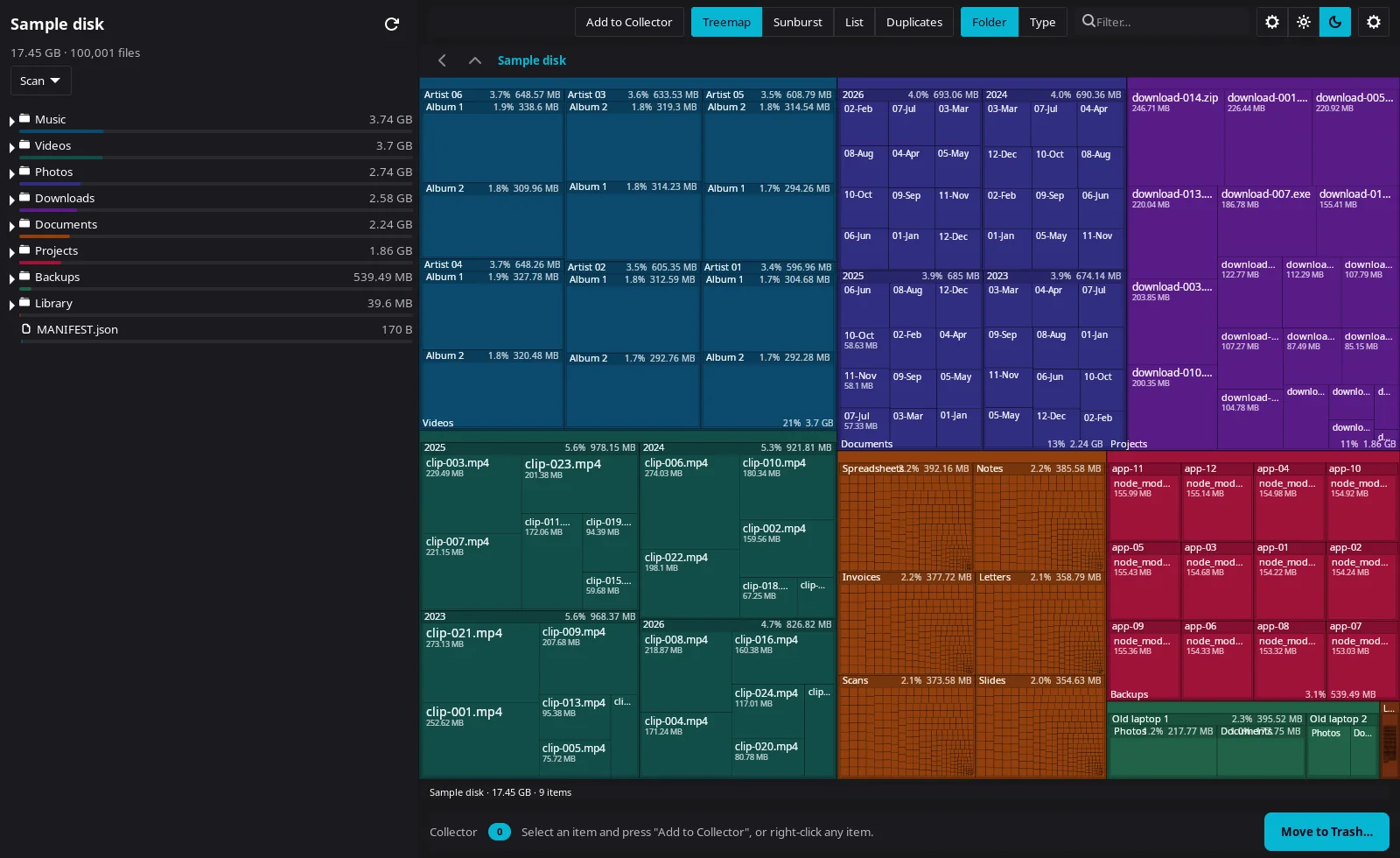
Diskaroo on Linux showing a dark treemap of the same 100,000-file test folder, 17.45 GB, with the folder list and sizes in the sidebar
Diskaroo's treemap of the same folder on Linux.Diskaroo 0.8.3 on Linux with the Cinnamon desktop (kernel 6.14),
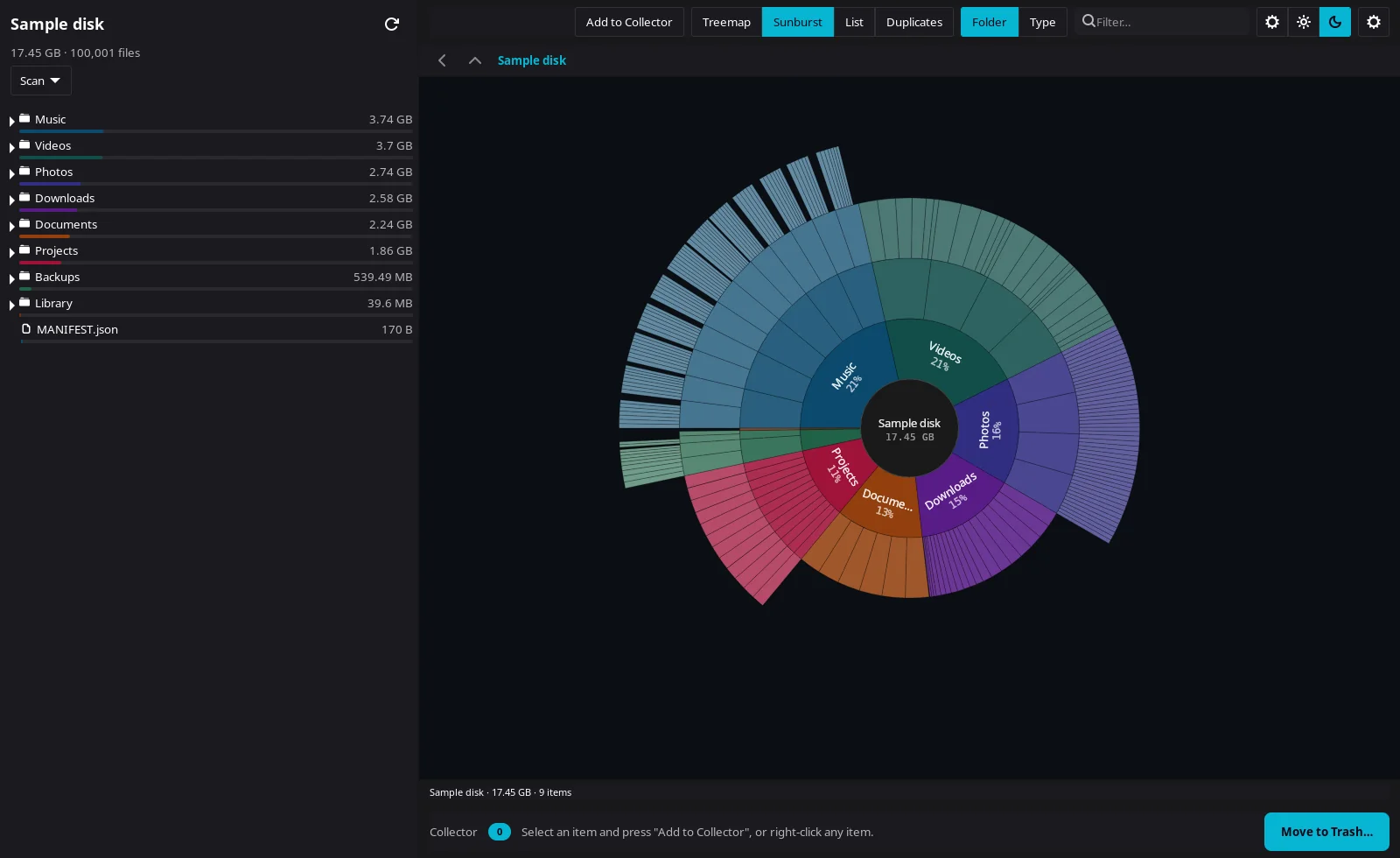
Diskaroo on Linux showing the test folder as a sunburst chart around a 17.45 GB center
The Linux scan as a sunburst.Diskaroo 0.8.3 on Linux with the Cinnamon desktop (kernel 6.14),

Diskaroo vs TreeSize FAQs

Is TreeSize Free enough?

Yes, for mapping a home Windows PC: it shows a folder tree sorted by size, draws a treemap and exports a PDF at no cost. Duplicate search and the largest-files finder start at Personal, $25.20 per user per year. Diskaroo for Windows includes both, free with a Bravely Account.

Does TreeSize run on a Mac?

No. TreeSize runs only on Windows. From a Windows PC, TreeSize Professional can scan a Mac over SSH, and so can Personal on a typical home network, but JAM Software makes no macOS version; the Mac App Store's 'TreeSize - Disk Usage' is a different developer's app. Diskaroo runs on the Mac itself, and on Windows and Linux, under one free Bravely Account. Is there a TreeSize for Mac?

Does TreeSize find duplicate files?

Not in Free: checksum-based duplicate search starts at Personal ($25.20 per user per year, or $50 once). Diskaroo's is free on all three and compares contents.

Is Diskaroo free?

Yes. Diskaroo is a gift: sign in with a free Bravely Account, map your first folder, then claim Diskaroo Pro in the app, free, for life. No card, no trial clock, no subscription.

Is there a TreeSize for Linux?

No. JAM makes TreeSize only for Windows; Personal (home networks only) and Professional scan a Linux machine over SSH from a Windows PC. Diskaroo runs on the Linux machine itself: 64-bit (x64) Linux with GTK 4, as a .deb or an AppImage, free with a Bravely Account.

What's a good TreeSize alternative for Linux?

Diskaroo, if you want the same app and account on Mac, Windows and Linux, a duplicate finder that compares contents, and the Collector. Other Linux options: GNOME's Disk Usage Analyzer (Baobab), KDE's Filelight, QDirStat, or ncdu in a terminal on a server.

Is TreeSize a subscription?

Free costs $0 for private, non-commercial use. Personal is $25.20 per user per year, or $50 once (perpetual, 12 months of updates). Professional is from $49.20 per user per year, billed annually, with no perpetual option on JAM's editions page. Diskaroo is free.

Diskaroo icon

Diskaroo

Treemap disk visualizer

Free with a Bravely Account. No card, no trial clock, no subscription.

Pricing verified . TreeSize pricing source. Subject to change.