Pay once
Terminal Tags Pro
Terminal Tags unlocked on every platform & device
$19.99once
one-time unlock · no subscription
30-Day Money-Back Guarantee
 Terminal Tags: Colored labels for your
 Works on any app, not just terminals. Press Ctrl+Shift+`, click a window and name it. Pick a tag from the menu bar or tray and its window comes to the front.
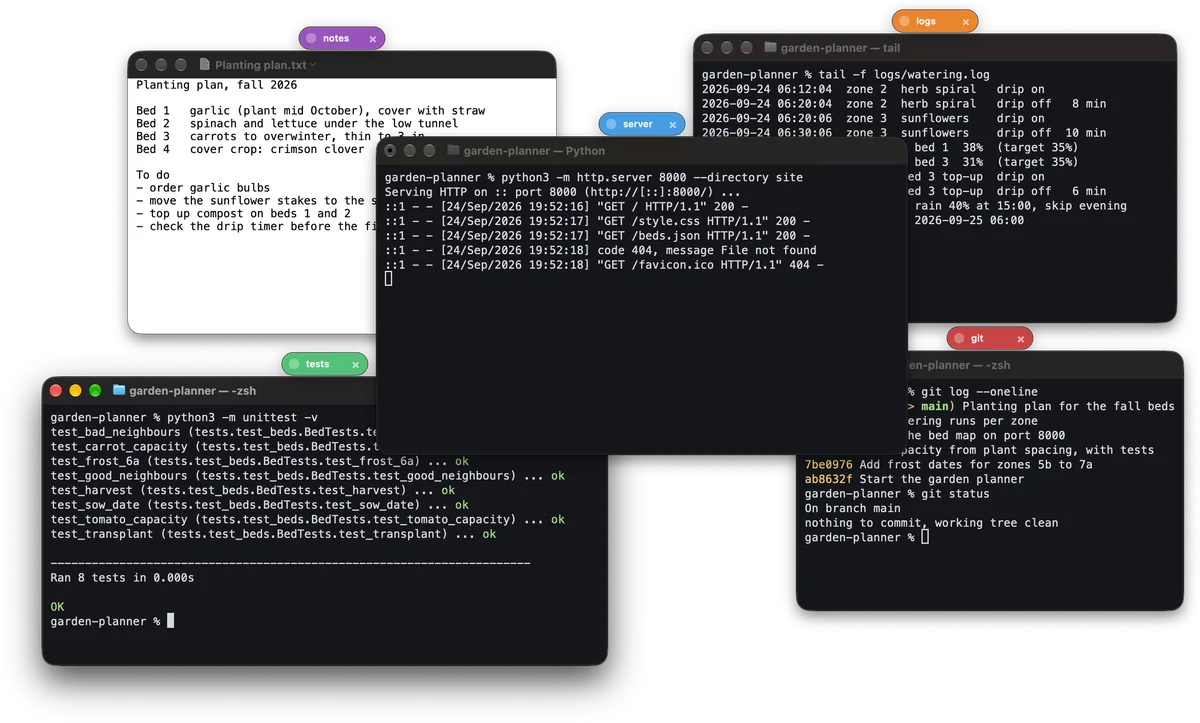
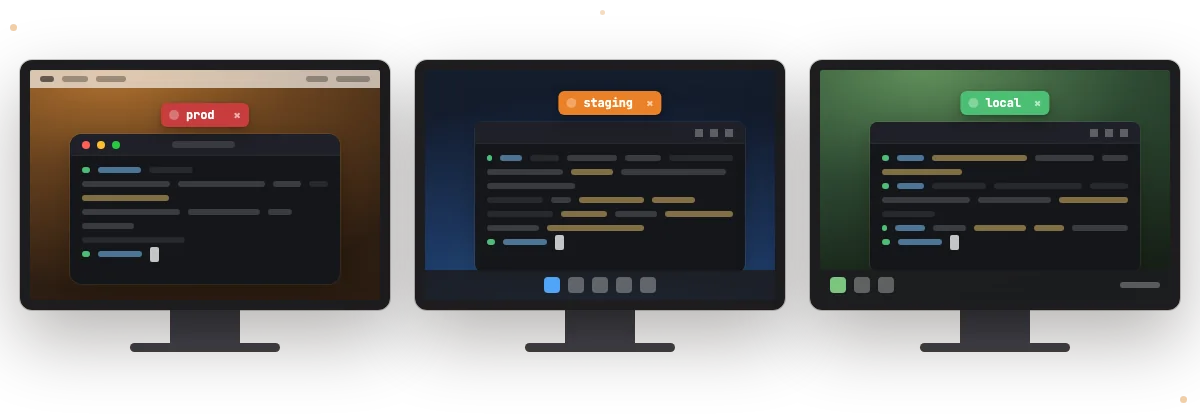
Terminal Tags is a menu-bar and tray app for Mac, Windows and Linux that puts a colored, named tag on the top edge of any window you pick, so identical terminal windows are easy to tell apart.
Not just terminals. Tag any app window — editors, browsers, design tools — whatever you need to keep straight.
Press Ctrl+Shift+` from anywhere, click the window and name it. Change the shortcut in Settings.
The tag sits on the window’s top edge and moves with it. It hides while the window is minimized and goes away when the window closes.
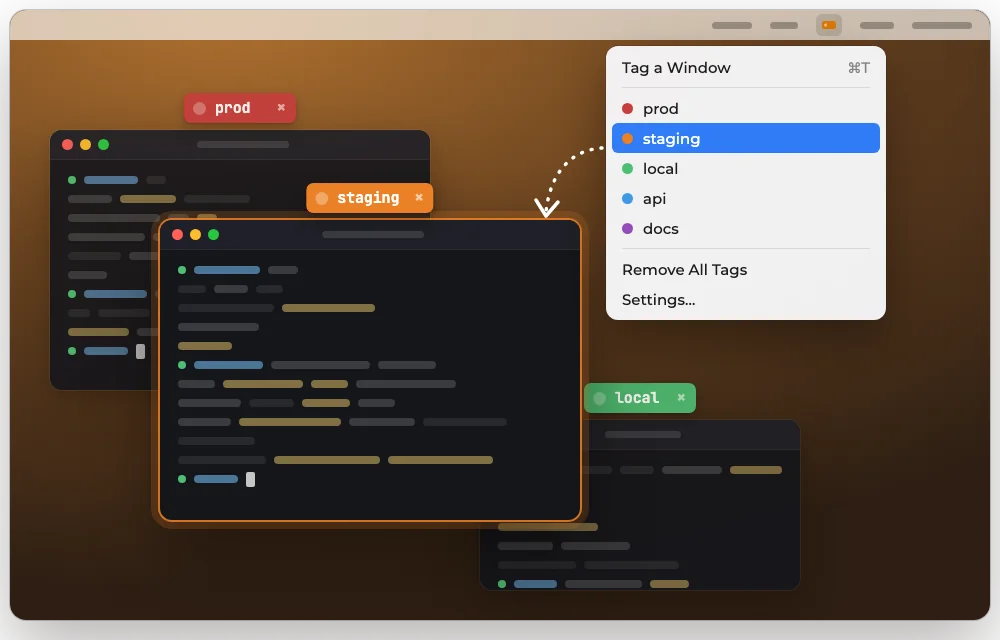
Every tag is listed in the menu bar on a Mac and in the tray on Windows and Linux. Pick one and its window comes to the front.
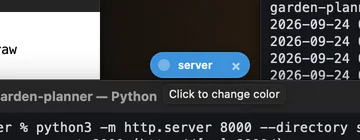
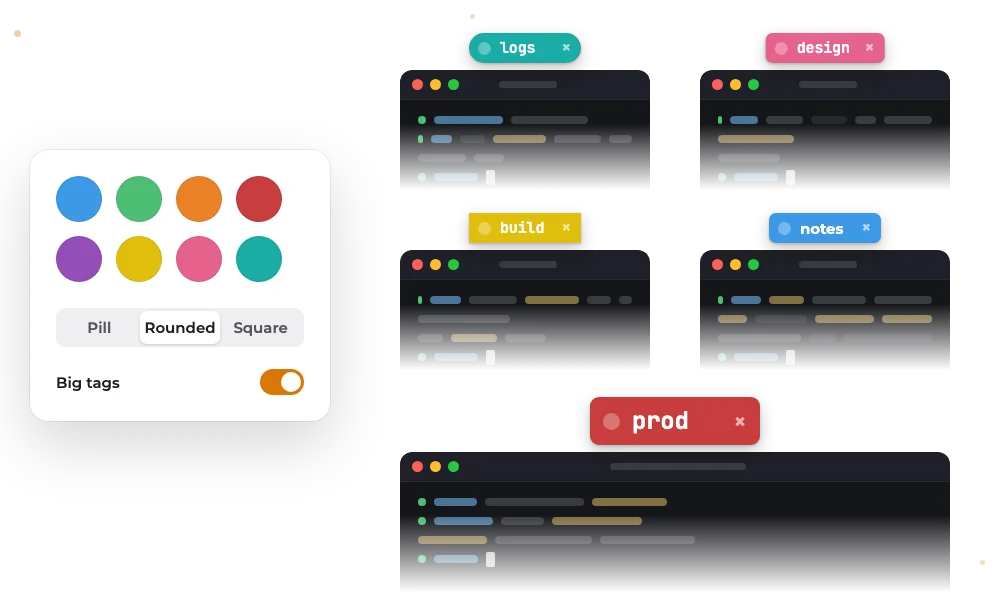
The color dot changes the tag’s color, the name is where you type, and × removes the tag.
Eight colors to start. Change any color’s background and text, add your own, or reset to the defaults.
Pick the tag shape (Pill, Rounded or Square) and the font.
Turn on Big tags for labels you can read from across the room.
Running ten terminals at once? Tag each one and the whole desktop reads at a glance.
Terminal Tags labels windows and never reads the text inside them. Your tag names are never part of our analytics.
One purchase unlocks Terminal Tags on Mac, Windows and Linux. Sign in with the same Bravely Account on each.
Terminal Tags keeps itself up to date on Mac, Windows and Linux.
No main window: Terminal Tags lives in the menu bar on a Mac and in the tray on Windows and Linux, where Linux adds a tag-list window.
Turn on Launch at login in Settings so Terminal Tags is running whenever you sign in. It’s off until you turn it on.
Our product analytics are tied to your Bravely Account and never carry a tag’s name. Turn them off in Settings.
Press Ctrl+Shift+` from anywhere, or choose Tag a Window. The screen dims; click the window you want and type a name. The tag rides on top of that window wherever it goes.

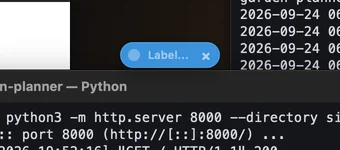
Press Ctrl+Shift+` from anywhere, click the window and name it. Change the shortcut in Settings.
The tag sits on the window’s top edge and moves with it. It hides while the window is minimized and goes away when the window closes.
The color dot changes the tag’s color, the name is where you type, and × removes the tag.
Running ten terminals at once? Tag each one and the whole desktop reads at a glance.
Find it fast
Every tag is listed by color and name in the Terminal Tags menu: in the menu bar on a Mac, in the tray on Windows and Linux. Pick one and that window comes to the front.
Eight colors to start, each one editable: change its background and text color, add your own, or reset to the defaults. Pick Pill, Rounded or Square, choose the font, and turn on Big tags to read them from across the room.
Buy Terminal Tags once and it’s unlocked on every machine you sign in to with the same Bravely Account. Your tags live on the computer where you made them, for as long as their window is open.
macOS 14 or later, on Apple silicon or Intel
Windows 10 or 11 (x64)
64-bit (x64) Linux with GTK 4, on an X11 desktop

Try every feature free for 24 hours. No card needed. When it ends, you can add 24 more hours, once.
Pay once
Terminal Tags unlocked on every platform & device
$19.99once
one-time unlock · no subscription
30-Day Money-Back Guarantee
Annual + Bonus
Terminal Tags Pro for a year, plus all 8 other Bravely apps, free
$0.00for 7 days
then $95.99/yr · cancel anytime
30-Day Money-Back Guarantee
FREE full access to the 8 other premium utilities, all platforms





Lifetime + Bonus
Terminal Tags Pro forever, plus all 8 other Bravely apps, free, forever
$399once
no subscription · all updates included
30-Day Money-Back Guarantee
FREE lifetime access to the 8 other premium utilities, all platforms
One sign-in · instant unlock on every computer. Secure checkout opens right here.
Any app window, not just terminals: your terminal, your editor, your browser. On a Mac or a Windows PC, whatever window you click. On Linux, windows on an X11 desktop; on a Wayland session, native Wayland windows can’t be tagged.
It’s gone. A tag belongs to one window and lasts as long as that window is open: close the window, quit Terminal Tags or restart, and you tag again. Turn on Launch at login in Settings so Terminal Tags is running whenever you sign in.
Pick its tag from the Terminal Tags menu in the menu bar (Mac) or the tray (Windows and Linux), or from the tag-list window on Linux, and the window comes to the front. On the tag itself, the color dot changes its color, the name is where you type, and × removes it.
Yes. Install it, sign in and tag your first window, then use everything free for 24 hours with no card, plus 24 more hours once. After that, buy it once for $19.99 for Mac, Windows and Linux, or pick a Bravely Premium plan.
Yes. Terminal Tags Pro unlocks Terminal Tags on Mac, Windows and Linux, on every computer you sign in to with the same Bravely Account.
Where your windows are and which app owns them, so a tag can follow its window. It never reads the text inside a window, and your tag names are never part of our analytics. Analytics are tied to your Bravely Account, and you can turn them off in Settings. On a Mac it asks for Accessibility so it can bring a tagged window to the front; Screen Recording is optional. Windows and Linux ask for nothing.
Yes. It starts as Ctrl+Shift+`, the key under Esc. Pick a different shortcut in Settings.
Yes. It tags whatever window you click, in any app: Terminal, iTerm2, Windows Terminal, a VS Code window or your browser. There is no list of supported apps. On Linux, the window has to be on an X11 desktop.
A tab color or tab title lives in one terminal app’s tab bar, and you set it up app by app. A Terminal Tags tag sits on the top edge of the window itself, in any app, and every tag is listed in the menu bar or tray, where picking one brings its window to the front.
No. It labels windows and lists them. It doesn’t start, split or save sessions, and it never reads the text inside a window. Your terminal app or tmux runs the sessions; Terminal Tags tells their windows apart.
More on Terminal Tags