MonitorMonitor
Brightness keys, sliders, spots and layouts, with hardware brightness where the monitor supports it.
Your Mac’s brightness keys stop at the built-in screen. MonitorMonitor gives your external monitors hardware brightness from the keyboard and the menu bar, wherever the monitor supports it, then puts your windows where you want them. Part of the Mac Utility Bundle: $19.99 once, yours forever.
All five, plus every Mac-only menu bar utility we add later
Mac Utility Bundle
one-time · yours forever
- Calebar(menu-bar calendar)included
- Barmony(menu bar organizer)included
- Sleepover(keep-awake)included
- Graf(system stats)included
- MonitorMonitor(display + window control)included
…and every Mac-only menu bar utility we add later, included.
one payment · every Mac you own · secure checkout opens right here
Sign in with your Bravely account and your purchase unlocks it.
Displays
Monitors that support it, controlled like the built-in one
The keys, sliders and sensible defaults your Mac only gives its own display, with hardware brightness where the monitor supports it.
Brightness keys that finally work
Your brightness keys change the display under the pointer, with its own hardware brightness wherever it has one, and show a level on that display. Volume keys drive the monitor's speakers when they're your sound output.
Sliders in the menu bar
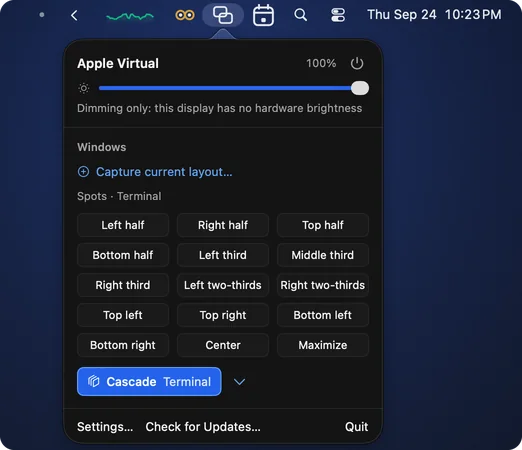
One click opens a row per display: brightness, contrast, and volume when the panel reports it. No window, no settings to dig through.
Dimmer than the hardware allows
Keep pressing brightness-down at 0% and MonitorMonitor dims below the panel's own floor. Any brightness-up press brings it back.
Good defaults, on the moment you sign in
The settings people swear by switch on when you sign in, the ones that suit this Mac and its displays. A card lists each with its reason and its own switch, plus Undo all, and the list stays in Settings › Good Defaults.
Switch inputs from the menu bar, or with one key
Each monitor that supports it gets an input picker in the menu bar, for a screen you share with another computer, and each input can have its own hotkey to move the monitor between your Mac and that computer with one key press. If a switch would take away the screen you're working on, MonitorMonitor asks first.
Turn a monitor off
Turn a monitor off and back on from the menu bar or with a hotkey, using its own power control. A monitor without one can still go dark through macOS display sleep when it's your only lit screen. Monitors with power control can also turn off when your Mac locks and come back when you unlock.
Crisp scaling for non-Retina monitors
MonitorMonitor offers a sharper scaled mode for 1440p and ultrawide panels. Pick Try it, and unless you keep it, it reverts after 15 seconds. A mode you keep comes back whenever the display reconnects.
Survives sleep and re-plugging
Brightness, contrast, volume, dimming and the mode you chose are re-applied after sleep and whenever a display reconnects.
Windows
Windows in their place
Spots, layouts and a cascade, so a desk full of windows sets itself up. Built alongside Terminal Tags, and it shows.
Spots
Halves, thirds, two-thirds, quarters, center, maximize, or a rectangle you draw yourself. Press a left or right half again and the window steps to a third, then two-thirds, or send it to the next or previous display.
Layouts that come back when you re-dock
Capture an arrangement once. With Apply automatically on, the windows on your current desktops return to their places when you plug the same monitors back in.
Hotkeys for all of it
Give any spot, saved layout or saved cascade (up to four) a hotkey, and each monitor input and power a key of its own. F13 to F20 included.
Cascade, built for Terminal Tags
Cascade steps an app's windows down a neat diagonal, each step at least 32 points, so every Terminal Tags tag clears the window above it. Undo cascade puts them back where they were.
Menu bar controls need
No permissions at all
Brightness, contrast, volume, dimming, inputs and power from the menu bar work the moment you sign in, with zero prompts. So do input and power hotkeys and crisp scaling.
Keys and windows need
One permission, asked once
The brightness and volume keys and moving windows share the window control permission. MonitorMonitor asks for it when you first use them, never before, and you can revoke it any time.
One purchase. Every update.
MonitorMonitor is part of the Mac Utility Bundle: one $19.99 purchase that covers all five apps and every Mac-only menu bar utility we add later. There is no upgrade fee when a big version lands and no yearly cutoff on updates. If you already own the bundle, MonitorMonitor is on your account now.
Questions, Answered
Which monitors does it work with?+
Any display that answers the hardware brightness request. MonitorMonitor probes each display rather than assuming: hardware control is only offered after the monitor confirms it. Some ports, docks and adapters don't pass that control channel through; those displays get software dimming instead, and the app says so plainly rather than pretending.
Does it need any permissions?+
The menu bar controls need none: brightness, contrast, volume, dimming, switching inputs and turning a monitor off all work without a prompt, and so do input and power hotkeys and crisp scaling. The brightness and volume keys and the window features (spots, layouts, cascade) share one permission, the window control permission. MonitorMonitor asks for it when you first use them, never before, and you can revoke it in System Settings at any time; the menu bar controls keep working without it.
Does it read my screen?+
No. MonitorMonitor never uses screen recording and never reads what's on your screen. To capture a layout, and to put windows back when your displays change, it reads window positions and titles on your Mac, stores them on your Mac, and never uploads them.
What's the deal with Terminal Tags?+
Terminal Tags puts a colored tag above each terminal window. MonitorMonitor's Cascade steps a stack of windows down a neat diagonal, each step at least 32 points, so every Terminal Tags tag clears the window above it. Cascade works without Terminal Tags installed too; it steps by the title bar instead.
How does the Mac Utility Bundle work?+
One $19.99 purchase, one time. You get all five apps: MonitorMonitor, Calebar (menu-bar calendar), Barmony (menu bar organizer), Sleepover (keep-awake), and Graf (system stats), plus every Mac-only menu bar utility we make after that. It all lives on your Bravely account, on every Mac you own. Already own the bundle? MonitorMonitor is on your account now.
Is it a subscription? What about major versions?+
No subscription, no renewals, and no paid major-version upgrades. Pay $19.99 once and every update to MonitorMonitor, and everything else we add to the bundle, is yours.
Which Macs does it run on?+
MonitorMonitor runs on macOS 14 Sonoma or later, on Apple silicon or Intel. Download it, drag it to your Applications folder, and sign in with your Bravely account. It lives in your menu bar, and on first run it offers to start whenever you log in.