Latest videoPrint shopPodcastNewsletterBook a shoot
Made with Bravely
SR
Sam Rivera
Photos, zines and the odd podcast.
Latest videoPrint shopPodcastNewsletterBook a shoot
Made with Bravely
SR
Sam Rivera
Photos, zines and the odd podcast.
Latest videoPrint shopPodcastNewsletterBook a shoot
Made with Bravely
SR
Sam Rivera
Photos, zines and the odd podcast.
Latest videoPrint shopPodcastNewsletterBook a shoot
Made with Bravely
SR
Sam Rivera
Photos, zines and the odd podcast.
Latest videoPrint shopPodcastNewsletterBook a shoot
Made with Bravely
+1
Clicks per link
Latest video
Print shop
Podcast
How it works
Build your link page in three steps
1
Add your links
Sign in free, then add links, a theme and a handle.
2
Publish
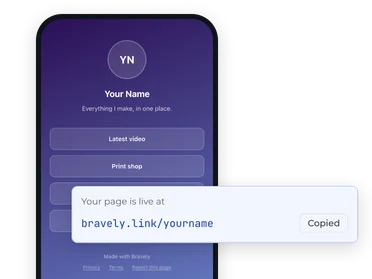
Go live at bravely.link when it looks right.
3
Share it
One URL everywhere, with clicks counted per link.
What you get
Everything included, free
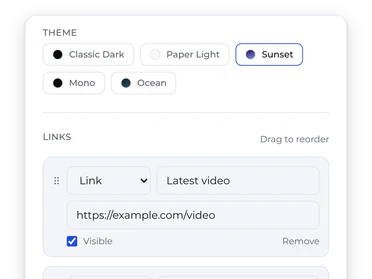
All your links, your order
Up to a hundred links, headers and socials.
Ten themes, four link styles
Rounded, pill, tall or outline links, each with an optional logo and subtitle.
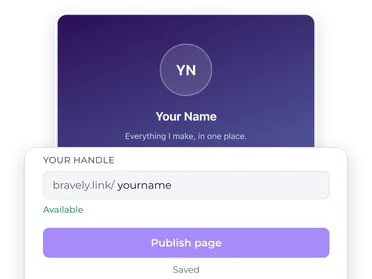
A handle you choose
bravely.link/your-handle, checked as you type.
Live preview while you build
The same renderer as your public page.
Click counts per link, per day
See which links earn their spot.
Up to ten pages per account
One for the band, the shop and the side project.
What people make with it
Creators
Musicians
Small businesses
Job seekers and portfolios
Events
Good to know
Video/samPhotos/samMusic/sam
Latest videoPrint shopPodcastNewsletter
Why a link-in-bio page still matters
Every platform gives you one link. Make it a menu of everything you do, and update it in one place.
Read more
Nearly every platform hands you exactly one clickable link and no say in how it works. Your profile is where people decide they are interested; the bio link is where that interest either goes somewhere or evaporates. A link page turns the single slot you are given into a menu of everything you do.
It also separates your links from your bios. Drop a release, open a shop, change jobs, and you update one page. Every profile you have ever pasted your handle into is already current. The page itself is the small part; never chasing stale links across five platforms again is the real product.
Ours keeps the format honest: your photo, your words, your links, in a theme you pick, with nothing wedged between your content and your visitors. Upload a photo and crop it right in the editor, reorder links by dragging, and publish when it looks right.
Clicks per link, this week
Print shop
Latest video
Podcast
Newsletter
Own the click: what analytics tell you
Taps are counted per link, per day, so the numbers can set the order.
Read more
A link page is a front door, and click counts are its traffic report. Because every link is counted separately, day by day, you can answer questions a bare bio link never could. Did the new video actually move people? Does anyone tap the merch link, or is it holding the top slot out of habit?
Let the numbers set the order. Put the link you care about most on top, watch a week of counts, and rearrange based on what visitors actually do. Pages edited by evidence keep earning taps long after pages edited by guesswork go stale.
Frequently asked questions
Is the link page builder really free?
Yes. Sign in with a free Bravely account and everything is included: themes, click counts, photo upload, up to ten pages, and publishing. There is no paid tier behind any of it, and nothing to cancel because nothing is billed.
Is there a watermark or upsell on my published page?
No. Your page carries no watermark, no upgrade banners, and no ads. The only Bravely presence is a small “Made with Bravely” line in the footer, and your visitors are never asked to sign up for anything.
Can I use my own domain?
Not yet. Every page publishes at bravely.link/your-handle. We would rather tell you that plainly than dangle a roadmap. If custom domains arrive later, your existing page and handle will keep working either way.
How do the click analytics work?
Each link on your published page routes through a quick redirect that counts the tap, then sends the visitor straight to the destination. Counts are kept per link, per day, which is enough to see what actually gets clicked and when. Clicks are what we count; we do not build profiles of your visitors.
Can I change my handle or theme later?
Yes to both. Themes switch instantly and take effect when you republish. Handles can change too: publish under a new one and it becomes your page's address while the old handle is released. Links pointing at the old handle stop working, so update your bios after a rename.
What happens if someone reports my page?
Every published page carries a report link, and reports come to us for review. We also look over new pages ourselves. Pages used for spam, scams, phishing, malware, pirated content, or impersonation are suspended. If you use your page honestly, moderation is something you will never notice.
Do I need an account to start building?
Yes, a free one. The builder opens once you sign in with a free Bravely account and claim it, with no card and nothing to cancel. After that, your page saves as you build.
Can I make more than one page?
Yes. Each account can run up to ten pages, each with its own handle, links, theme, and click counts. A switcher at the top of the editor moves between them.