Diskaroo vs GrandPerspective — honest comparison

Looking for a GrandPerspective alternative? Here's an honest Diskaroo vs GrandPerspective comparison. Diskaroo has what GrandPerspective doesn't: a duplicate finder that compares file contents, the Collector for clearing a whole batch in one go, a sunburst and a largest-items list, and versions for Windows and Linux as well as the Mac, all free with a Bravely Account. If you only use a Mac and want open-source software with deep colour and filter controls, GrandPerspective, in development since 2005, is the one to get.

Free with a Bravely Account. No card, no trial clock, no subscription.

Diskaroo vs GrandPerspective at a glance

At a glanceDiskarooGrandPerspective
Entry priceFree (Diskaroo Pro, with a free Bravely Account)Free (SourceForge)
Next plan upFree: no card, no subscription$2.99 (Mac App Store)
Lifetime licenseFree for life (Mac + Windows + Linux)Free or $2.99, the same app either way
PlatformsMac, Windows, LinuxMac

Where Diskaroo and GrandPerspective each win

Pick Diskaroo if

  • Windows and Linux as well as the Mac. GrandPerspective runs only on macOS, so a Windows PC or Linux machine needs a second tool; one free Bravely Account covers Diskaroo on all three.
  • A duplicate finder that compares file contents (the size, then the start of each file, then the whole file) and sends the extra copies to the Trash, one copy of each kept. GrandPerspective has no duplicate finder.
  • The Collector: add files from any folder as you explore, review the whole batch, then move it to the Trash in one go, or delete it for good. A running Total Space Saved shows what you've won back.
  • A sunburst and a list of each folder's items, sorted by size, alongside the treemap.

Pick GrandPerspective if

  • Free from SourceForge or $2.99 on the Mac App Store, the same app either way, and open source under the GPL. The SourceForge build asks for no account; Diskaroo asks you to sign in with a Bravely Account.
  • Deeper treemap controls: colour by name, extension, file type, folder, level, size, or creation, modification or last-access time, and filter tests on name, path, size, file type and more. Diskaroo colours by folder or file type and filters by name or extension.
  • Save a scan, reload it later, and export the results as an image or text. Diskaroo can't save or export a scan to a file.
  • It's on the Mac App Store, reviewed by Apple. Diskaroo is a direct download.
  • More than twenty years of releases, since version 0.90 in September 2005.

Diskaroo vs GrandPerspective, feature by feature

Verified . Source linked at the bottom.

FeatureDiskarooGrandPerspective
PlatformsMac, Windows and Linux (one account)Mac only
Runs onmacOS 14 or later (Apple silicon or Intel); Windows 10 or 11 (x64); 64-bit (x64) Linux with GTK 4macOS 14 or later since 3.8.1 (Apple silicon or Intel); older releases, still on SourceForge, run on macOS 10.5 to 13
PriceFree with a Bravely AccountFree (SourceForge) or $2.99 (Mac App Store)
Account neededYes, a free Bravely AccountNo (SourceForge build)
Source codeClosed sourceOpen source (GPL)
ViewsTreemap, sunburst, largest-items list, duplicatesTreemap
Colour the map byFolder or file typeName, extension, type, folder, level, size or file dates
FiltersName or extension only (no size filter)Name, path, size, file type and more
Duplicate finderYes, by file contentsNo
Collector tray (stage, review, then clear)Yes, with a running Total Space SavedDelete from the view, once turned on in Preferences (single files or whole folders, optional confirmation)
Save and reload a scanNoYes, and export as image or text
Quick Look and Reveal in FinderYesYes
Mac App StoreNo (direct download)Yes
First released20262005

Diskaroo on Windows and Linux: what we ran, and when

Screenshots and measurements from our own machines, . A generated test folder: 100,000 files in 3,698 folders, 17.45 GB, with 250 planted sets of duplicate files. It holds no one's real files, and the same seed builds the same folder on Windows and Linux.

Linux · measured

under 0.5 s

Scan of the same folder on Linux, with the page cache dropped before each run.

All 5 runs had finished within 0.47 s of pressing Rescan. The status line was sampled every 0.1 to 0.2 s, so each figure is an upper bound. Repeat scans had finished within 0.33 s.

Build
Diskaroo 0.8.3
System
Linux with the Cinnamon desktop (kernel 6.14)
Machine
a desktop PC with an AMD Ryzen 5 7600X
Disk
TEAM TM8FP6512G 512 GB NVMe SSD (ext4)
How to repeat it
  1. Generate the same test folder on the drive.
  2. Scan it once in Diskaroo.
  3. Drop the page cache: sync, then echo 3 | sudo tee /proc/sys/vm/drop_caches, and wait 2 seconds.
  4. Press Rescan and time until the status line shows the finished folder.
  5. Repeat 5 times.
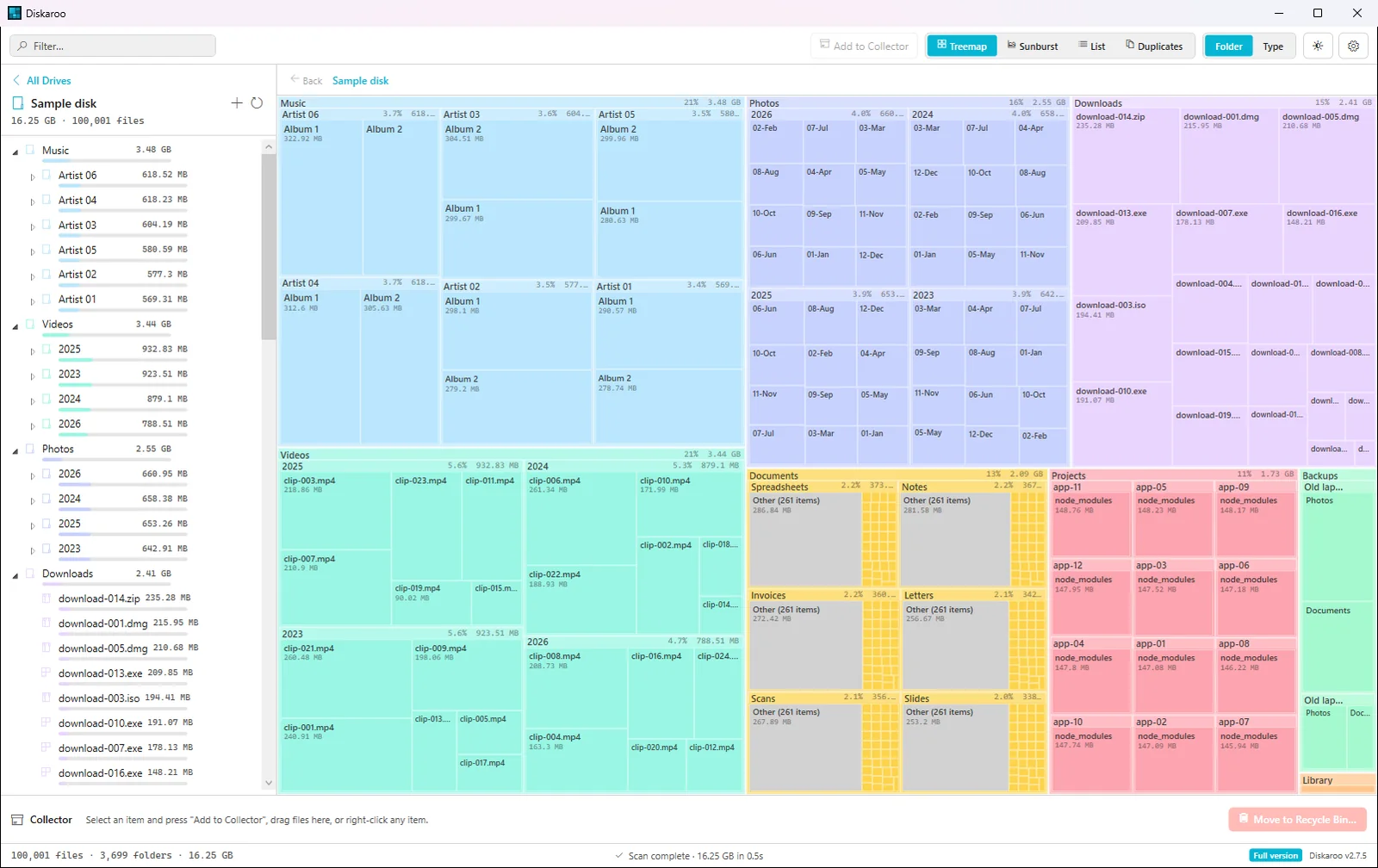
Diskaroo on Windows 11 showing a treemap of a 100,000-file test folder, with Music, Videos, Photos and Downloads drawn as the largest blocks and each folder's size listed in the sidebar
Diskaroo's treemap of the test folder on Windows 11.Diskaroo 2.7.5 on Windows 11 Pro 25H2 (build 26200),
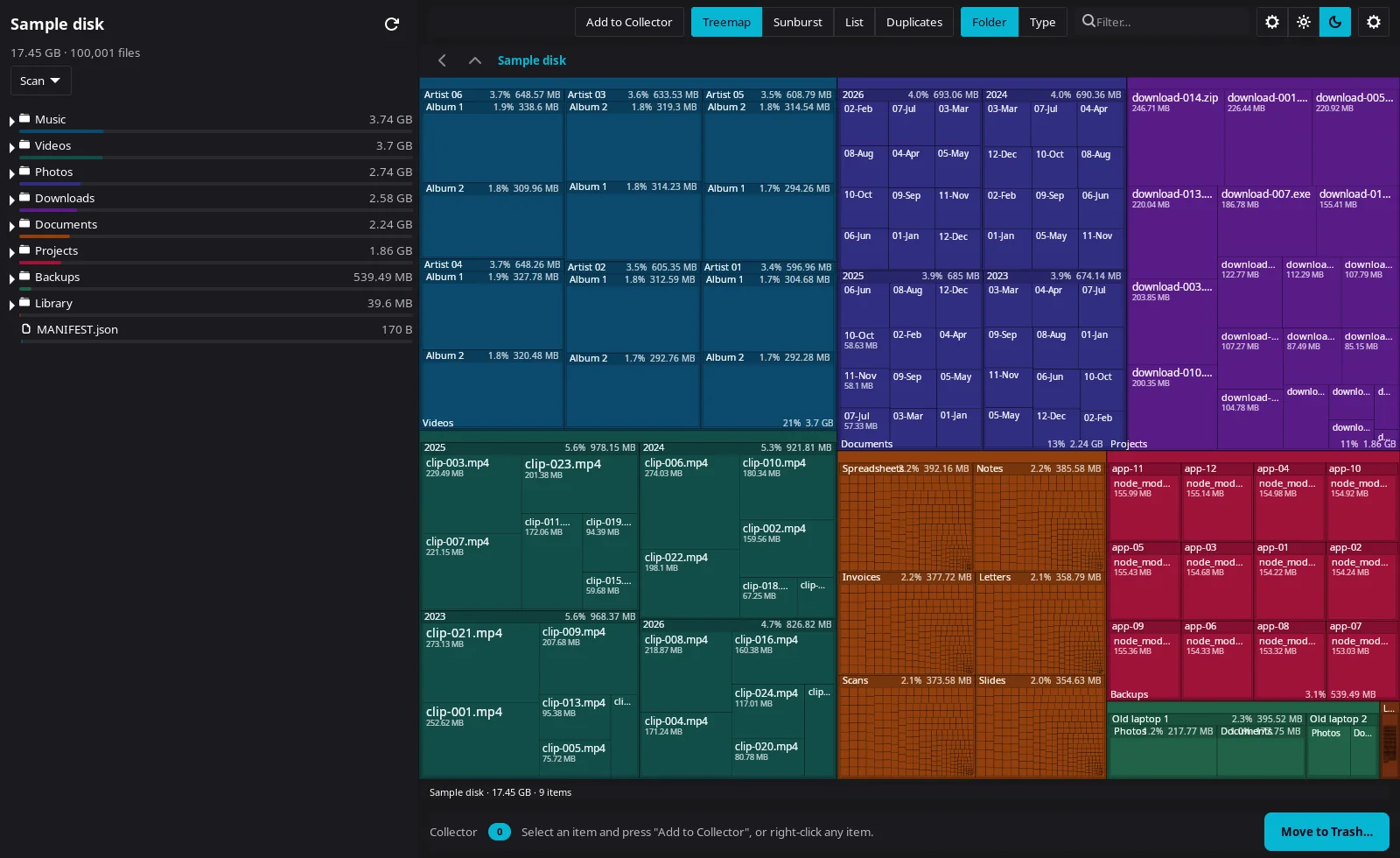
Diskaroo on Linux showing a dark treemap of the same 100,000-file test folder, 17.45 GB, with the folder list and sizes in the sidebar
Diskaroo's treemap of the same folder on Linux.Diskaroo 0.8.3 on Linux with the Cinnamon desktop (kernel 6.14),

Diskaroo vs GrandPerspective FAQs

Is GrandPerspective free?

Yes, from SourceForge. It's $2.99 on the Mac App Store, and its developer says it's the same app either way. Diskaroo is a gift: sign in with a free Bravely Account, map your first folder, then claim Diskaroo Pro in the app, free, for life. No card, no trial clock, no subscription.

Does GrandPerspective find duplicates?

No. It maps disk usage but has no duplicate finder. Diskaroo compares file contents (the size, then the start of each file, then the whole file), skips files under 1 KB, and sends the extra copies to the Trash with one copy of each kept.

Does GrandPerspective run on Windows or Linux?

No. GrandPerspective is a Mac app. Diskaroo runs on Mac, Windows and Linux, and one free Bravely Account covers all three.

Does Diskaroo need Full Disk Access on a Mac?

Only to scan the whole Mac. Your home folder and any folder you pick scan without it. When you choose Scan This Mac, Diskaroo explains why and shows you where to turn it on: System Settings, then Privacy & Security, then Full Disk Access.

Diskaroo icon

Diskaroo

Treemap disk visualizer

Free with a Bravely Account. No card, no trial clock, no subscription.

Pricing verified . GrandPerspective pricing source. Subject to change.