Calebar
Your calendar, one click away.
A fast, friendly calendar that lives in your Mac menu bar. Click Calebar in the menu bar, jump to any day, and get back to work: no app to open, nothing to manage. Part of the Mac Utility Bundle: $19.99 once, yours forever.
All five, plus every Mac-only menu bar utility we add later
Mac Utility Bundle
one-time · yours forever
- Calebar(menu-bar calendar)included
- Barmony(menu bar organizer)included
- Sleepover(keep-awake)included
- Graf(system stats)included
- MonitorMonitor(display + window control)included
…and every Mac-only menu bar utility we add later, included.
one payment · every Mac you own · secure checkout opens right here
Sign in with your Bravely account and your purchase unlocks it.
A calendar, the way it should be
No window to babysit, nothing to manage. Calebar does one thing beautifully: it puts a clean calendar and your day’s events a single click from wherever you’re working.
Lives in your menu bar
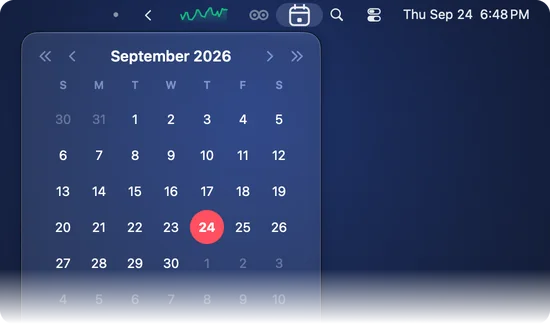
Click Calebar in your menu bar and a clean month slides open. No Dock icon, no window to manage, no app to launch: it's just there when you want it.
Jump to any day
Flip months with a click, hop forward to a deadline or back to last quarter, and find any date in seconds. Browsing the calendar is the whole point.
Back to today
However far you've wandered, one click snaps you back to today. No scrolling, no hunting — the date you actually need is always a tap away.
Quiet by design
Calebar sits silently in the menu bar until you reach for it. No notifications, no badges, no clutter — just a calendar, exactly when you want one.
Light or dark, automatically
Calebar follows your Mac's appearance, so it looks right at home in the menu bar whether you keep things bright or work in the dark.
One purchase, a growing toolkit
Calebar is part of the Mac Utility Bundle: $19.99 once for all five apps, plus every Mac-only menu bar utility we add later.
Your events
Your day, right under the date
Click a day and Calebar lists what’s on it: events from the calendars on your Mac, Google calendars you’ve added there included. It reads them, never changes them, and your events stay on your Mac.
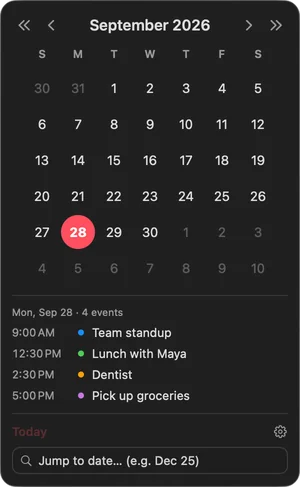
The calendars on your Mac
Everything in your Calendar app
iCloud, Google, Exchange and any other account you’ve added to your Mac, plus calendars shared with you. Calebar asks macOS for calendar access when you choose to show your events, and you can turn it off any time in System Settings.
Google Calendar, if you connect it
Read-only, straight from Google to your Mac
Your Google Calendar, read directly, without adding the account to your Mac. When you connect it, Calebar asks Google for read-only access to your calendar so it can show your events in the menu-bar calendar, and for your email address so Settings can show which account is connected. Your events go from Google to your Mac and nowhere else, and you can disconnect any time in Calebar’s Settings.
Calebar privacy policy: exactly what Calebar reads, where it keeps it, and how to remove its access.
Small. Fast. Out of your way.
Remember clicking the clock on the old Windows taskbar and getting a calendar right there? That, on your Mac, done nicely. Calebar leads the Mac Utility Bundle, one $19.99 purchase that covers all five apps and every Mac-only menu bar utility we add later, and it stays out of your way until you need a date.
Questions, Answered
How does the Mac Utility Bundle work?+
One $19.99 purchase, one time. You get all five apps: Calebar, Barmony (menu bar organizer), Sleepover (keep-awake), Graf (system stats), and MonitorMonitor (display + window control), plus every Mac-only menu bar utility we make after that. It all lives on your Bravely account, so it's yours on every Mac you own.
What does Calebar actually do?+
It puts a clean, fast calendar one click away in your Mac menu bar, a lot like the old taskbar calendar, done nicely. Click Calebar in the menu bar, see the month, jump to any day, and get back to whatever you were doing.
Is it a subscription?+
No. One payment, no renewals, no trial countdown. Pay $19.99 once and the bundle — including everything we add to it later — is yours forever.
I claimed Calebar when it was free — do I keep it?+
Yes, forever. Nothing changes for you: your claim lives on your Bravely account, and Calebar stays yours across reinstalls and new Macs.
Which Macs does it run on?+
Calebar runs on macOS 14 Sonoma or later, on Apple silicon or Intel. Download it, drag it to your Applications folder, sign in with your Bravely account, and it settles into the menu bar from then on.