Sleepover
No bedtime for your Mac.
One click keeps your Mac awake — for 15 minutes or all night. No schedules to program, no permissions to grant. Part of the Mac Utility Bundle: $19.99 once, yours forever.
All five, plus every Mac-only menu bar utility we add later
Mac Utility Bundle
one-time · yours forever
- Calebar(menu-bar calendar)included
- Barmony(menu bar organizer)included
- Sleepover(keep-awake)included
- Graf(system stats)included
- MonitorMonitor(display + window control)included
…and every Mac-only menu bar utility we add later, included.
one payment · every Mac you own · secure checkout opens right here
Sign in with your Bravely account and your purchase unlocks it.
Awake exactly as long as you need
Sleep settings live five clicks deep and always apply to everything. Sleepover is the opposite: an owl in your menu bar that means “stay up, just for now.”
One click, wide awake
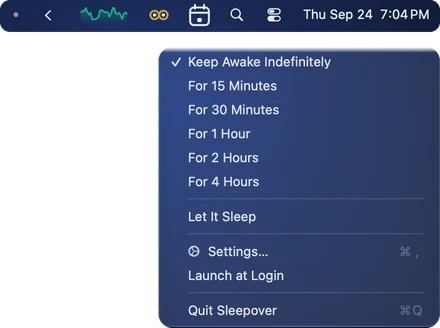
Click the owl in your menu bar and your Mac stays up. Click again and it's back to normal. That's the entire learning curve.
Durations that match real life
15 minutes, 30, an hour, two, four, or indefinitely. Set it for the length of the download, the presentation, or the render — it ends itself on time.
Display sleep vs. system sleep
Keep the whole Mac running while the screen dims, or hold the display on too — a single toggle. Great for long downloads with the screen dark, or dashboards that stay lit.
Simple on purpose
No schedules, no scripting language, no settings maze. Keep-awake tools grow features nobody asked for. Sleepover does the one job, every time.
Sign in, then click the owl
No permissions to grant. Drag it to Applications, sign in with your Bravely account, and click the owl in your menu bar. It follows your Mac's appearance and stays out of your way.
One purchase, a growing toolkit
Sleepover is part of the Mac Utility Bundle: $19.99 once for all five apps, plus every Mac-only menu bar utility we add later.
Questions, Answered
What does Sleepover actually do?+
It stops your Mac from going to sleep while you need it up: during a long download, a render, a presentation, or anything else that dies when your Mac decides it's bedtime. One click on, one click off.
Can Sleepover keep my MacBook awake with the lid closed?+
No. Sleepover stops your Mac from going to sleep while it's idle, but it can't stop a MacBook from sleeping when you close the lid.
How long can it keep my Mac awake?+
Pick 15 minutes, 30 minutes, 1 hour, 2 hours, 4 hours, or indefinitely. Timed sessions end themselves, so you can't accidentally leave your Mac running all weekend.
What's the display vs. system sleep toggle?+
System-awake keeps the Mac working while the display is allowed to dim and turn off — perfect for background jobs. Turning display sleep off too keeps the screen lit, for dashboards, recipes, or anything you're actually watching.
How does the Mac Utility Bundle work?+
One $19.99 purchase, one time. You get all five apps: Sleepover, Calebar (menu-bar calendar), Barmony (menu bar organizer), Graf (system stats), and MonitorMonitor (display + window control), plus every Mac-only menu bar utility we make after that. It all lives on your Bravely account, on every Mac you own.
Is it a subscription?+
No. One payment, no renewals, no trial countdown. Pay $19.99 once and the bundle — including everything we add to it later — is yours forever.
Which Macs does it run on?+
Sleepover runs on macOS 14 Sonoma or later, on Apple silicon or Intel. Download it, drag it to your Applications folder, sign in with your Bravely account, and it settles into the menu bar from then on.