Graf
Your Mac, at a glance.
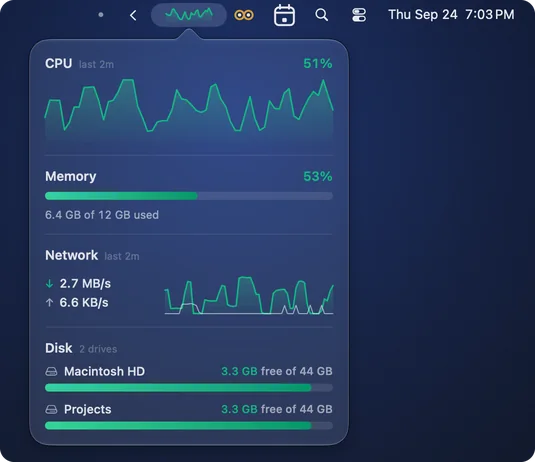
CPU, memory, network and every mounted drive, one click from your menu bar. Turn on the live graph and a CPU sparkline sits in the bar itself. Zero permissions. Part of the Mac Utility Bundle: $19.99 once, yours forever.
All five, plus every Mac-only menu bar utility we add later
Mac Utility Bundle
one-time · yours forever
- Calebar(menu-bar calendar)included
- Barmony(menu bar organizer)included
- Sleepover(keep-awake)included
- Graf(system stats)included
- MonitorMonitor(display + window control)included
…and every Mac-only menu bar utility we add later, included.
one payment · every Mac you own · secure checkout opens right here
Sign in with your Bravely account and your purchase unlocks it.
The numbers that matter, where you already look
Graf keeps CPU, memory, network and every mounted drive in the corner of your screen, one click away.
An optional live CPU graph
Turn on the live graph and a CPU sparkline sits in the menu bar itself. Until you do, Graf shows its compact icon.
The full picture, one click away
Click Graf in the menu bar and the popover opens with CPU, memory, network up/down, and disk: the numbers that actually explain what your Mac is doing right now.
Refresh every 1, 2 or 5 seconds
Graf refreshes every 1, 2 or 5 seconds, 2 by default.
Zero permissions
Graf never asks for a permission: no Screen Recording, no Accessibility, no prompts. Sign in with your Bravely account and your purchase unlocks it.
Quiet by design
No alerts, no badges, no daily digest. Graf sits in the bar until you look at it — information on your schedule, not notifications on its schedule.
One purchase, a growing toolkit
Graf is part of the Mac Utility Bundle: $19.99 once for all five apps, plus every Mac-only menu bar utility we add later.
Small. Fast. Out of your way.
System monitors tend to grow into dashboards with fifty widgets and a settings manual. Graf stays a glance: one icon in the bar, one popover with the four numbers you actually check. It’s part of the Mac Utility Bundle: one $19.99 purchase that covers all five apps and every Mac-only menu bar utility we add later.
Questions, Answered
What does Graf show?+
Click Graf in the menu bar for CPU, memory in use, network down and up, and every mounted drive with its free space. Turn on the live graph and a CPU sparkline sits in the menu bar itself.
Does it need any permissions?+
No. Graf never asks for a permission: no Screen Recording, no Accessibility, nothing to approve.
How does the Mac Utility Bundle work?+
One $19.99 purchase, one time. You get all five apps: Graf, Calebar (menu-bar calendar), Barmony (menu bar organizer), Sleepover (keep-awake), and MonitorMonitor (display + window control), plus every Mac-only menu bar utility we make after that. It all lives on your Bravely account, on every Mac you own.
Is it a subscription?+
No. One payment, no renewals, no trial countdown. Pay $19.99 once and the bundle — including everything we add to it later — is yours forever.
Which Macs does it run on?+
Graf runs on macOS 14 Sonoma or later, on Apple silicon or Intel. Download it, drag it to your Applications folder, sign in with your Bravely account, and it settles into your menu bar from then on.