Is There a DaisyDisk for Windows?

The short answer

No.

DaisyDisk runs only on macOS, and there is no Windows version. Diskaroo gives you the same kind of picture on Windows, a sunburst or a treemap you click to drill into, and the same free Bravely Account covers your Mac and your Linux machines too.

DaisyDisk runs on
  • Mac
Not on
  • Windows

Free with a Bravely Account. No card, no trial clock, no subscription.

Where DaisyDisk and Diskaroo each win

What DaisyDisk genuinely does well

  • A polished sunburst map with Apple's Editors' Choice badge on the Mac App Store.
  • A one-time $9.99 for up to 5 personal Macs, with a 30-day money-back guarantee.
  • It purges purgeable space, deletes APFS snapshots and scans as administrator (the edition sold on its own site).
  • It scans Dropbox, Google Drive, Microsoft OneDrive and Box directly in the cloud.

What Diskaroo gives you on Windows

  • A native, code-signed app for Windows 10 and 11 that installs just for you, with no admin prompt.
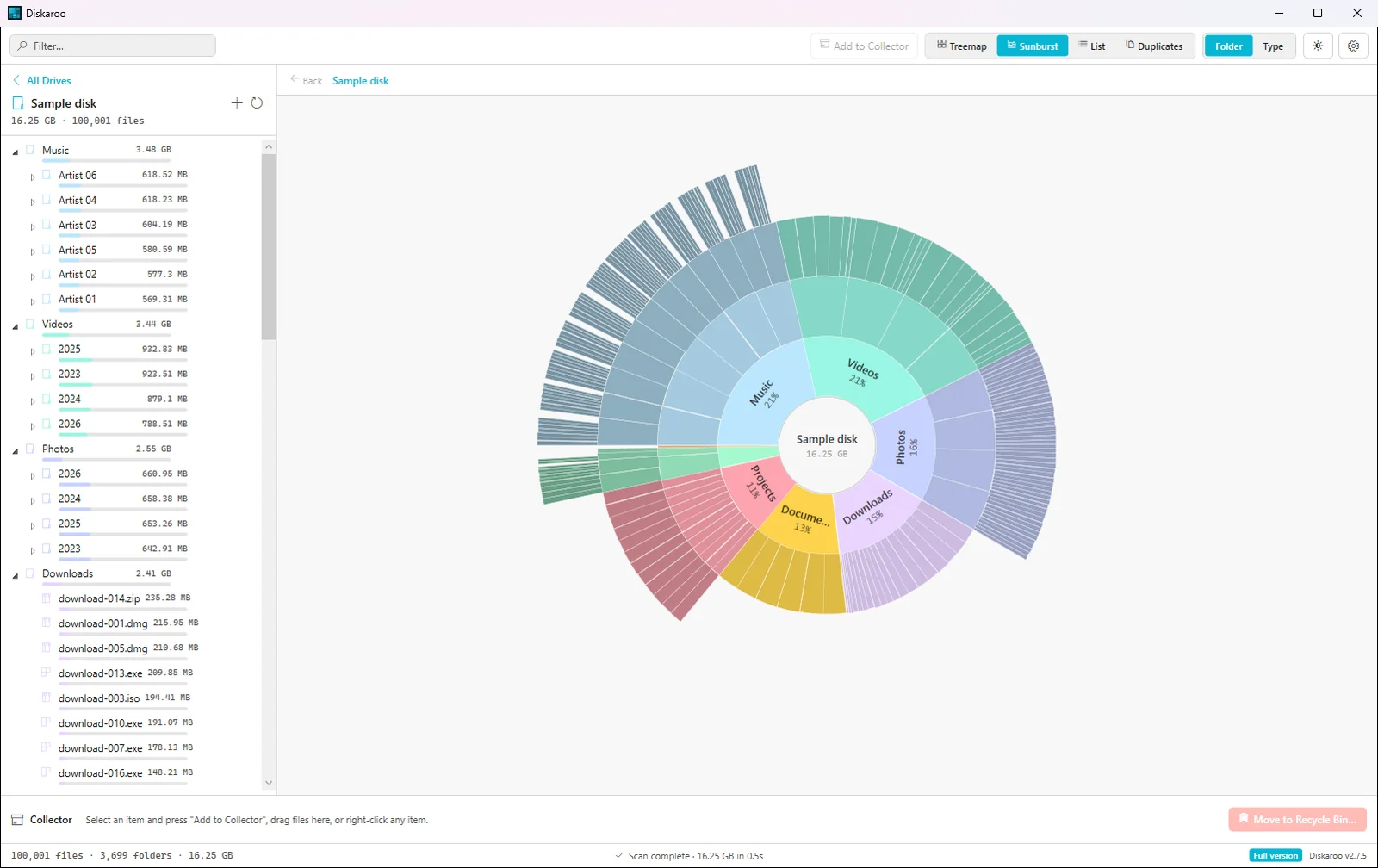
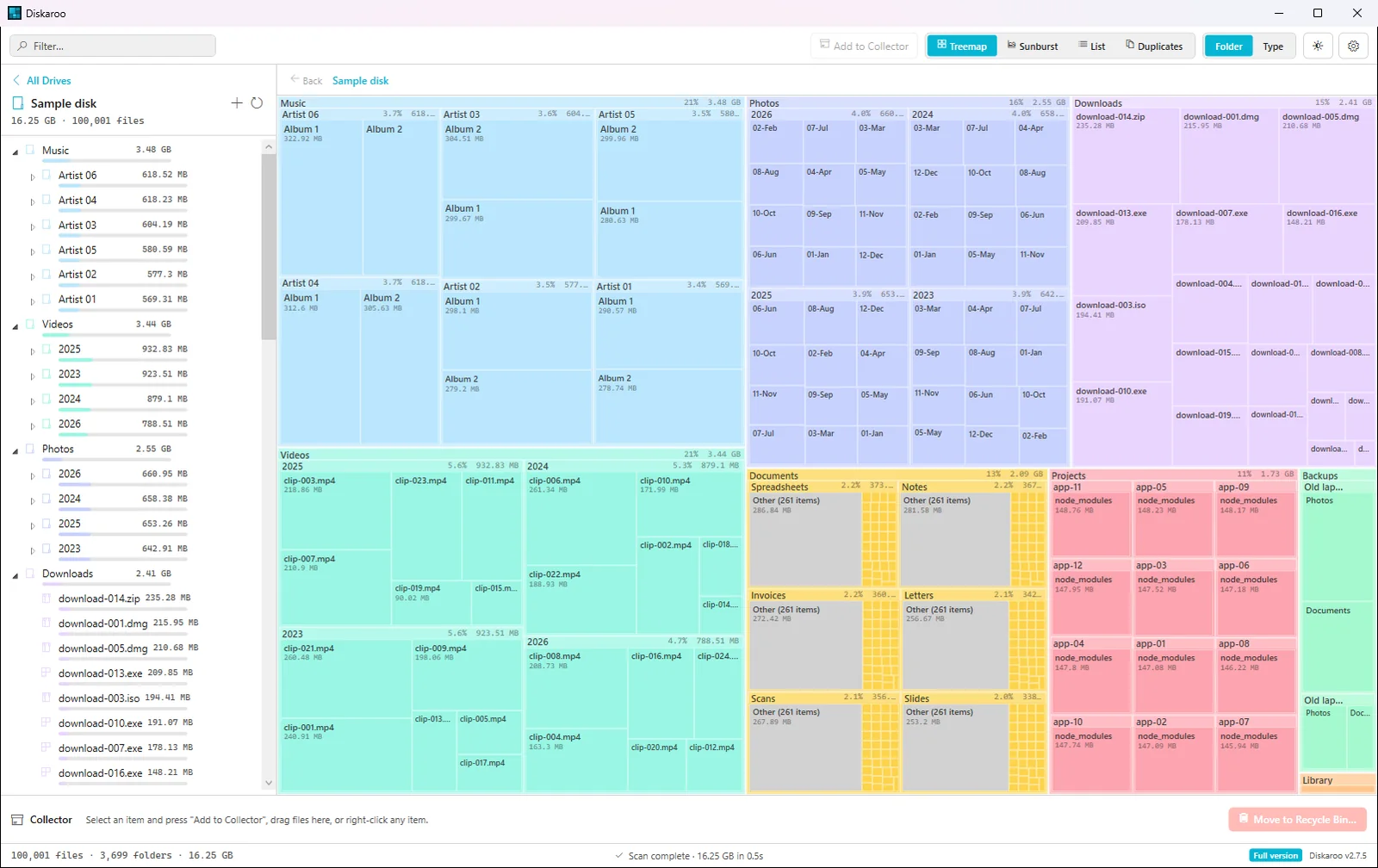
  • A sunburst view with the same ring layout DaisyDisk uses, plus a treemap, both with click-to-drill-in and breadcrumbs.
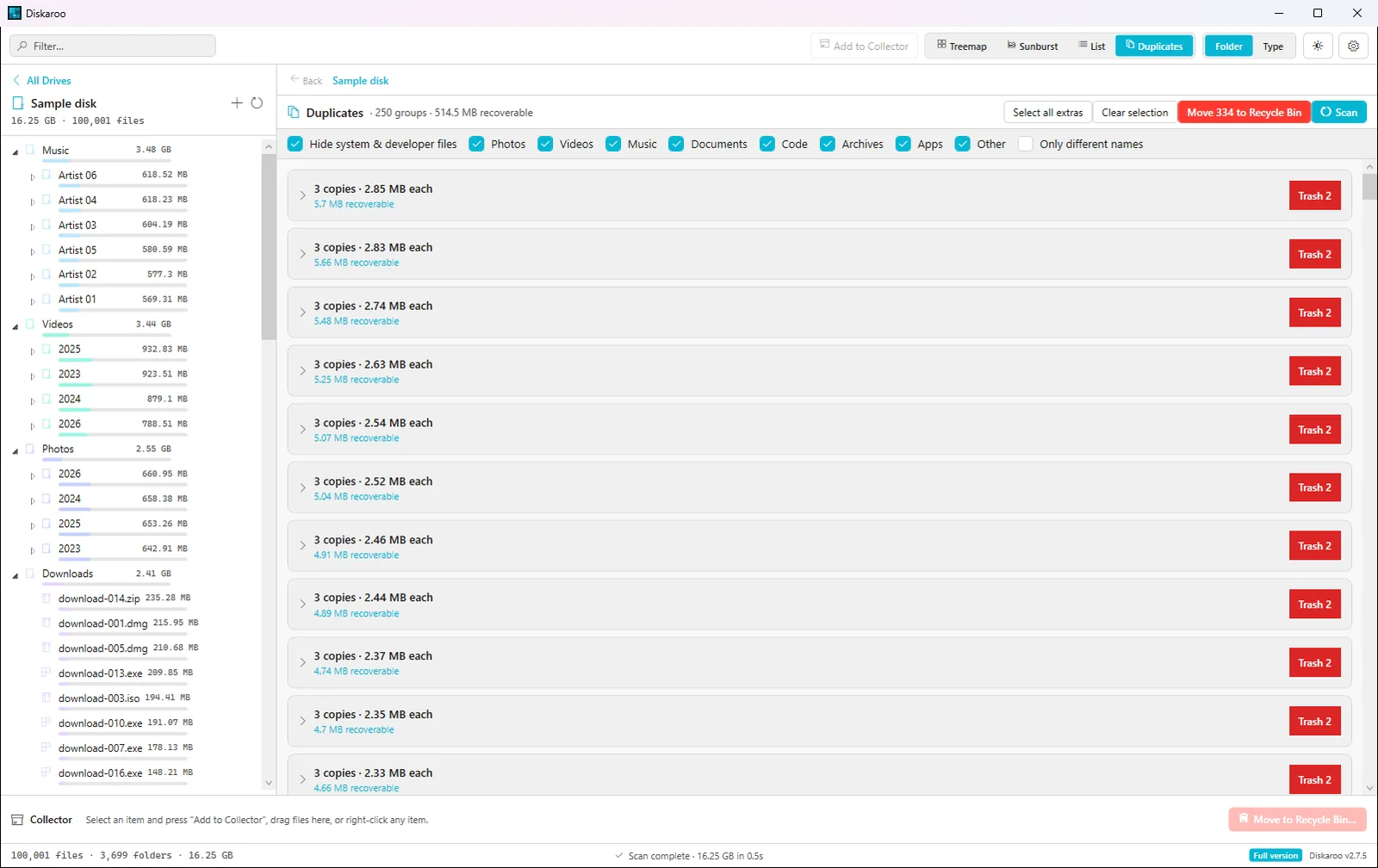
  • Exact duplicate files found by content in whatever you scanned, with one copy of each kept and the extras sent to the Recycle Bin.
  • A Collector: add what you want gone as you browse, review the batch, then send it to the Recycle Bin, or delete it for good if you mean it.

Diskaroo and DaisyDisk side by side on Windows

Verified . Source linked at the bottom.

On WindowsDiskarooDaisyDisk
Runs on WindowsYes, native (Windows 10 and 11)No, macOS only
VisualizationSunburst and treemap, click to drill inSunburst (on the Mac)
Duplicate detectionExact, by content, built inNo duplicate finder
Covers Mac, Windows and LinuxOne free accountMac only
Account neededYes (a free Bravely Account)No (a license key)
PriceFree (with a Bravely Account)$9.99 once (Mac only)

Diskaroo on Windows: what we ran, and when

Screenshots and measurements from our own machines, . A generated test folder: 100,000 files in 3,698 folders, 17.45 GB, with 250 planted sets of duplicate files. It holds no one's real files, and the same seed builds the same folder on Windows and Linux.

Windows · measured

5.2 s

First scan of the test folder on Windows, with Windows' file cache emptied before each run.

Median of 7 runs (1.0 to 16.4 s), read from Diskaroo's own status line. Repeat scans, with the files already cached, took 0.2 s (median of 5).

Build
Diskaroo 2.7.5
System
Windows 11 Pro 25H2 (build 26200)
Machine
a desktop PC with an AMD Ryzen 9 5950X and 32 GB of RAM
Disk
XPG GAMMIX S60 2 TB NVMe SSD (NTFS)
How to repeat it
  1. Generate the test folder on the drive.
  2. In Diskaroo, choose Choose Folder… and pick the test folder.
  3. Empty Windows' working sets and standby list (RAMMap's Empty menu does both), then wait 12 seconds.
  4. Press Rescan and read the time on the status line when it says Scan complete.
  5. Repeat 7 times and take the median.
Diskaroo on Windows 11 showing the same scan as a sunburst chart, with rings for Music, Videos, Photos, Downloads, Documents and Projects around a 16.25 GB center
The same scan as a sunburst.Diskaroo 2.7.5 on Windows 11 Pro 25H2 (build 26200),
Diskaroo on Windows 11 showing a treemap of a 100,000-file test folder, with Music, Videos, Photos and Downloads drawn as the largest blocks and each folder's size listed in the sidebar
Diskaroo's treemap of the test folder on Windows 11.Diskaroo 2.7.5 on Windows 11 Pro 25H2 (build 26200),
Diskaroo's duplicate finder on Windows 11 listing groups of three identical photos, 250 groups with 514.5 MB recoverable, each group with its own Trash button
Duplicates on Windows: 250 groups and 514.5 MB recoverable, exactly what was planted.Diskaroo 2.7.5 on Windows 11 Pro 25H2 (build 26200),

DaisyDisk for Windows: FAQs

Is DaisyDisk available for Windows?

No. DaisyDisk is a macOS app, with no build for Windows 10 or 11; its FAQ answers "Not right now, but we're exploring the possibility."

What is the closest DaisyDisk equivalent on Windows?

Diskaroo, if you want DaisyDisk's way of working: a sunburst map you click to drill into, and a Collector you fill and review before anything is cleared. If scan speed on NTFS drives matters most, WizTree reads the drive's Master File Table directly and is free for personal use.

Does Diskaroo have a sunburst like DaisyDisk?

Yes. Diskaroo opens on a treemap and switches to a sunburst in one click, on Windows, Mac and Linux.

When you should stay with DaisyDisk

If every computer you own is a Mac and you want to purge purgeable space and APFS snapshots, stay with DaisyDisk. Diskaroo makes sense the moment a Windows or Linux machine joins the house, with one free Bravely Account for all of them.

Diskaroo icon

Diskaroo

Treemap disk visualizer

Free with a Bravely Account. No card, no trial clock, no subscription.

DaisyDisk platform support verified on the DaisyDisk site. Subject to change. Full Diskaroo vs DaisyDisk comparison.