Is There a Shottr for Windows?

The short answer

No.

Shottr is a Mac app, for macOS 10.15 and later, and its site offers only a Mac download. PrintScreen.ly runs natively on Windows 10 and 11: one shortcut for region, window, full-screen and scrolling capture, an 8-tool markup editor, text grab, and screen recording to MP4.

Shottr runs on
  • Mac
Not on
  • Windows

Free for 24 hours: every feature, no card.

Where Shottr and PrintScreen.ly each win

What Shottr genuinely does well

  • It's free to use, and the Basic license is $12 once for up to five computers.
  • It's tiny and quick: a 2.4 MB download that grabs a screenshot in 17 ms, by its own measure.
  • It reads QR codes as well as text, and adds a screen ruler, a colour picker and gradient backgrounds.
What PrintScreen.ly gives you on Windows

  • A native Windows app: press Ctrl+Shift+1 and pick region, window, full screen or a scrolling capture.
  • Screen recording to MP4 with system sound and your microphone, at 30 or 60 fps.
  • An 8-tool markup editor with crop, eight colours and unlimited undo, plus text grab that reads the text right on your PC.
  • One account across Windows, Mac, Linux, your phone and the web, with your screenshots in one private 2 GB library.

PrintScreen.ly and Shottr side by side on Windows

Verified . Source linked at the bottom.

On WindowsPrintScreen.lyShottr
Runs on WindowsYes (Windows 10 and 11)No (Mac only)
Account neededYes (a Bravely Account)No: a license number unlocks commercial use
Scrolling captureYesYes, on the Mac
Text grab (OCR)Yes, read on your PCYes, on the Mac, with QR codes
QR codes, screen ruler, colour pickerNoYes, on the Mac
Backgrounds and rounded cornersNoYes, on the Mac
Pin a screenshot on topNoYes, on the Mac
Screen recordingYes (MP4 with sound)No
Synced libraryYes: 2 GB, on Windows, Mac, Linux, phones and the webNo (it uploads a screenshot to a public link, on Shottr's cloud or your own S3 bucket)

PrintScreen.ly on Windows: what we ran, and when

Screenshots and measurements from our own machines, . Test files only; no one's real data.

Windows · measured

0.23 s

From letting go of the mouse after selecting a region to the markup editor on screen, on Windows.

Median of 5 runs (0.21 to 0.27 s). A script watched for the editor window every 10 ms.

Build
PrintScreen.ly 1.18.0
System
Windows 11 Pro 25H2 (build 26200)
Machine
a desktop PC with an AMD Ryzen 9 5950X and 32 GB of RAM
How to repeat it
  1. Open PrintScreen.ly's capture picker and choose Region.
  2. Drag over part of the screen and let go.
  3. Time from letting go until the Markup Editor window is on screen.
  4. Repeat 5 times and take the median.
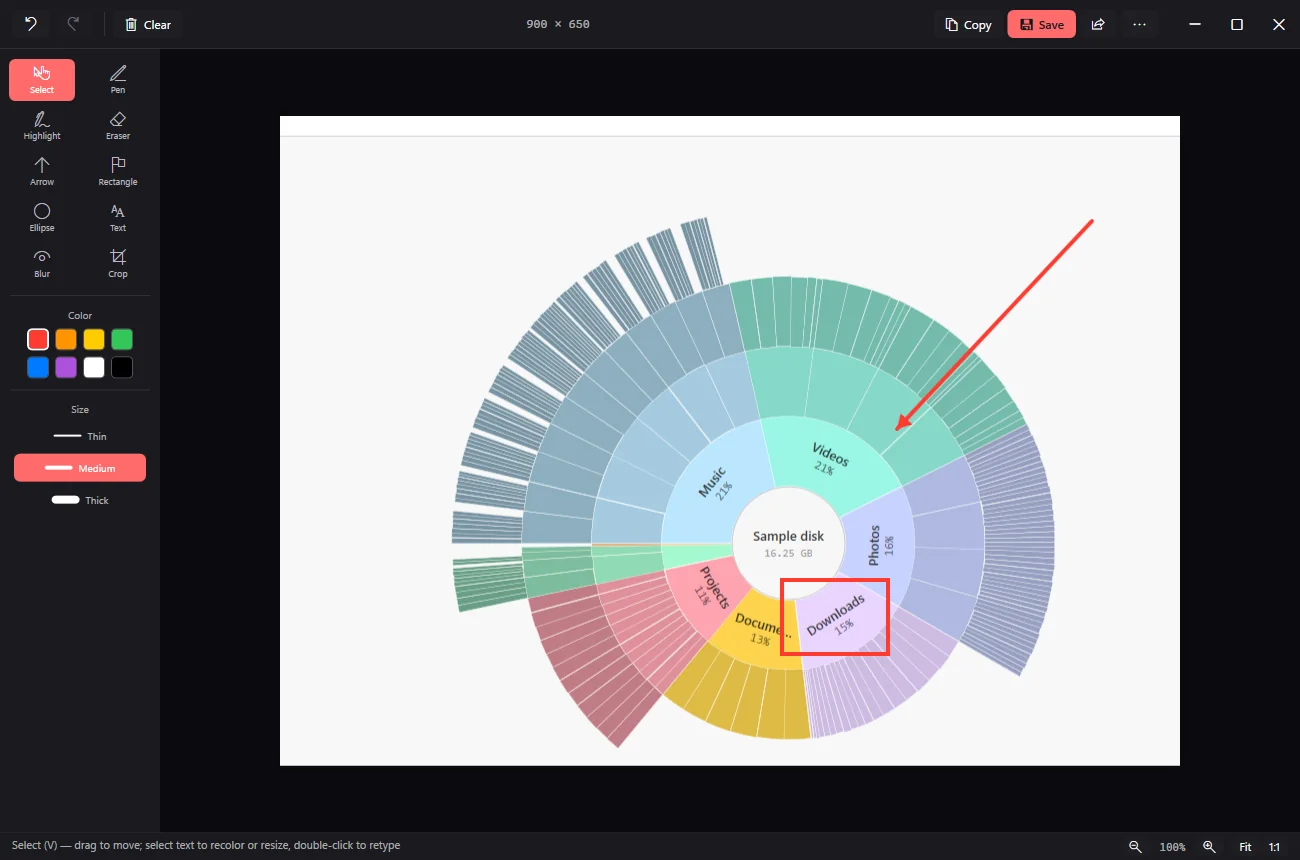
PrintScreen.ly's markup editor on Windows 11 with a region capture of a sunburst chart, a red arrow and a red box drawn on it, and the drawing tools in a panel on the left
A region capture in PrintScreen.ly's markup editor on Windows 11, with an arrow and a box added.PrintScreen.ly 1.18.0 on Windows 11 Pro 25H2 (build 26200),

Shottr for Windows: FAQs

Is Shottr available on Windows?

No. Shottr ships for macOS 10.15 and later only, and its own FAQ says a Windows version doesn't seem likely.

What can I use instead of Shottr on Windows?

PrintScreen.ly. On Windows, one shortcut opens region, window, full-screen and scrolling capture, and the editor adds markup and text grab; it runs on Mac and Linux too. ShareX is a free, open-source Windows option built for power users.

Can I use PrintScreen.ly on my Mac and my Windows PC?

Yes, on a Mac with Apple silicon (macOS 14 or later) and a Windows 10 or 11 PC. One account signs in on both, and your screenshots land in the same private 2 GB library, on your phone and the web too.

When you should stay with Shottr

If every screenshot you take starts and ends on one Mac, keep Shottr. PrintScreen.ly is for the Windows PC Shottr can't run on, and for screenshots that need to reach your other devices.

PrintScreen.ly icon

PrintScreen.ly

Screenshots & recordings

Free for 24 hours: every feature, no card.

Shottr platform support verified on the Shottr site. Subject to change. Full PrintScreen.ly vs Shottr comparison.