How to control your computer from an Android phone
The short answer
Install Scry on the computer you want to reach, whether it's a Mac, a Windows PC or a Linux machine, then install Scry from Google Play on the phone and sign in to both with the same account. The computer appears in the phone's list, and a tap puts its desktop on your Android screen, at home or away.
- Scry for Android needs Android 8.0 or later.
- Google's and Microsoft's free Android apps are compared further down, each with its catch.
Then put Scry on the computer you want to reach.
- Updated
- Outside facts dated and linked at the bottom
Get Scry on your Android phone
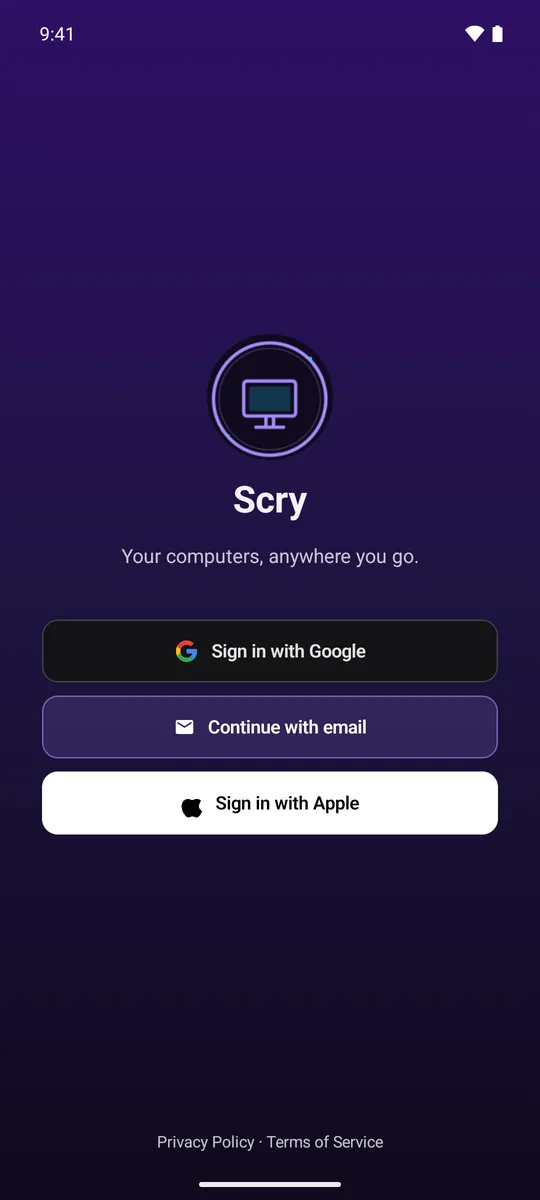
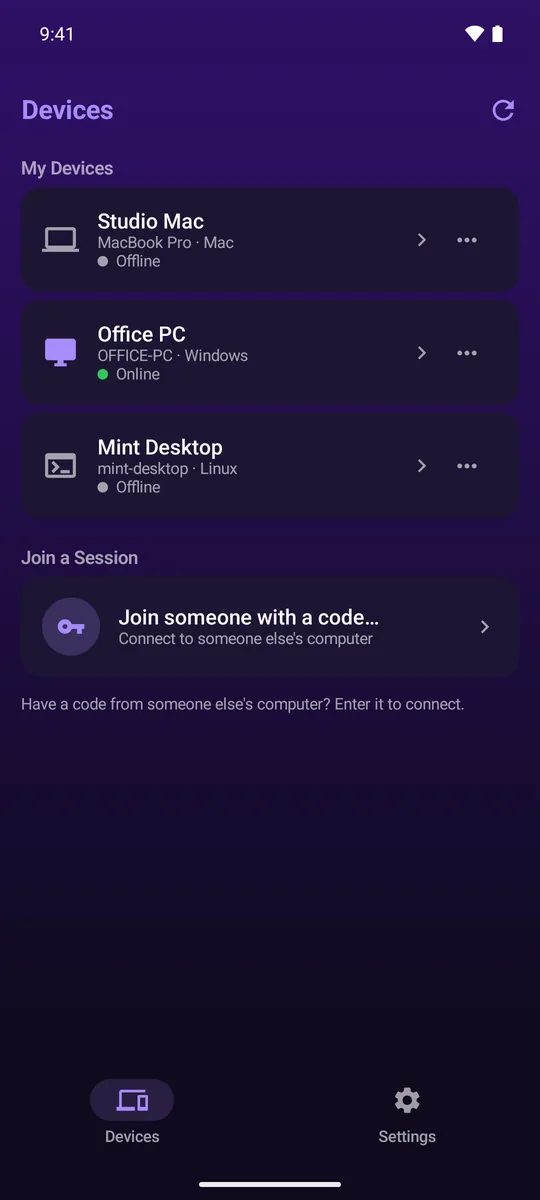
Watch this part 1:10Search Google Play for Scry, or open Scry's download page on the phone. Scry's first screen offers Sign in with Google, Continue with email and Sign in with Apple; pick the way you signed in on the computer, so both land on the same account. Every computer on it is then listed, with a green dot and Online when it can be reached.
- Install Scry from Google PlayAndroid 8.0 or later
- Sign inGoogle, email or Apple
- Tap the computerA green dot means it's online
Set up the computer it controls
- Install ScryMac, Windows or Linux
- Sign inThe same account as the phone
- Make it reachableWhat that computer asks for
- A Mac needs its Screen Recording and Accessibility permissions, and a Windows PC needs the background service that Windows' admin prompt installs. The details for a Mac are on control your Mac from your phone; for Windows, on control your PC from your phone; for Linux, with what it asks for, on remote desktop into Linux.
Touch, zoom and the key bar on Android
Watch this part 1:31- TouchA tap clicks right where it lands.
- TrackpadSlide anywhere to move the pointer, tap to click.
- PointerPush the arrow itself, then tap to click.
CtrlZUndoes the last change
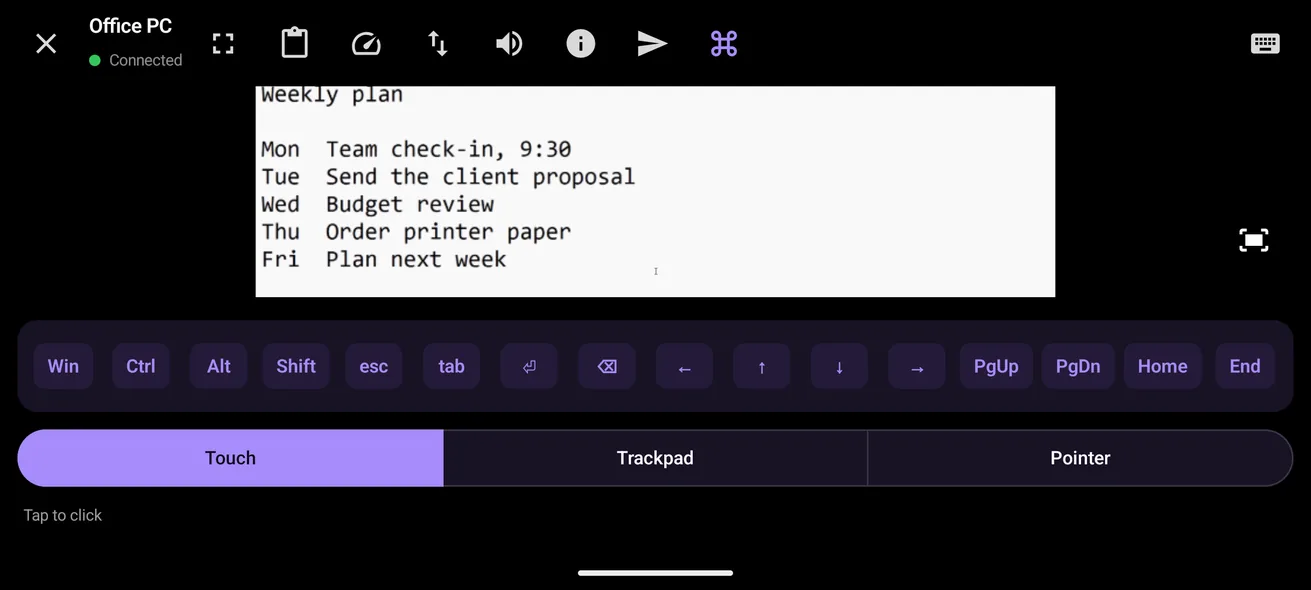
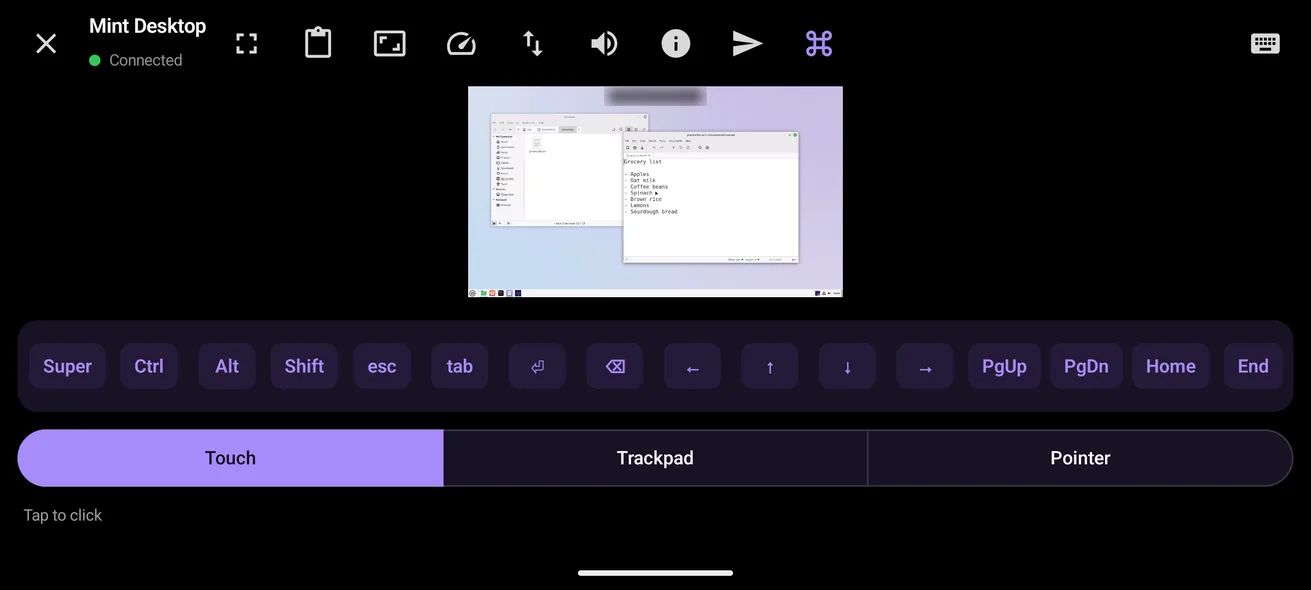
- When text is too small, pinch outward to magnify it as far as four times, and Fit to screen returns you to the full desktop.
- The key bar adapts to the computer: ⌘ ⌃ ⌥ ⇧ for a Mac, Win, Ctrl, Alt and Shift for a PC, and Super, Ctrl, Alt and Shift for Linux.
Copy and paste from Android
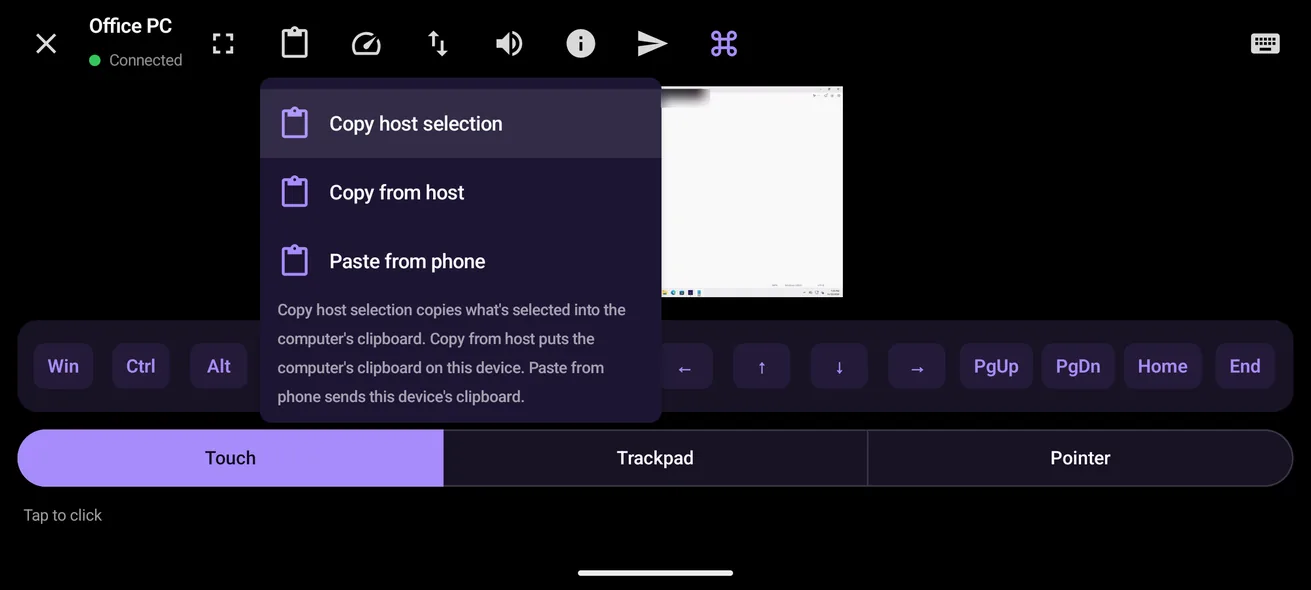
Watch this part 2:15Scry's clipboard menu on Android carries text both ways. Paste from phone sends what the phone has copied to the computer. The other way takes two steps: Copy host selection has the computer copy what's selected, and Copy from host puts the computer's clipboard on the phone.
On the go: mobile data and privacy
Watch this part 2:43- Encrypted from end to end
- Our servers can't see the picture
- Straight between the two when it can
- Through our relay when a network blocks that
- Scry for Android works on mobile data as well as Wi-Fi. If the signal drops, or the phone hops from Wi-Fi to mobile data, the session picks itself back up for up to two minutes.
- The phone's screen stays on while you're connected, and turning the phone sideways or using split screen keeps the session going.
Unlock a locked computer from Android
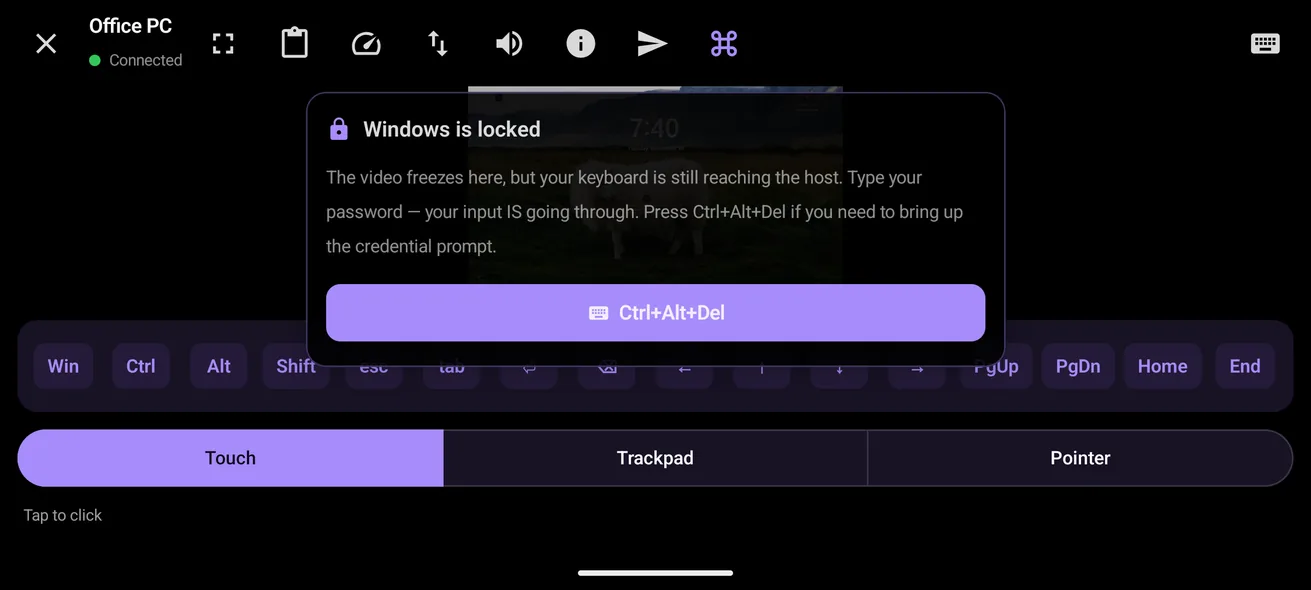
Watch this part 3:04A locked Windows PC shows up on the phone with a Windows is locked card and a Ctrl+Alt+Del button; tap it, then type the password. A locked Mac shows its own lock screen, where you type the password as you would at the desk.
Other Android apps for reaching a computer
The free ones, and what each needs from you.
What Scry for Android can’t do
- It can't make the Android phone itself reachable; the phone only connects out to your computers.
- Phones on Android 7 or earlier can't install it.
- It can't wake a computer that's asleep.
FAQs
Can I control my computer from my Android phone?
Yes. Scry for Android reaches a Mac, a Windows PC or a Linux computer that has Scry installed and is signed in to the same account, from home or anywhere else.
Can I control a Mac from an Android phone?
Yes. Apple has no Android app for it, but Scry for Android connects to a Mac running macOS 14 or later, with the Mac's ⌘, ⌃, ⌥ and ⇧ on its key bar.
Can I control a Windows PC from an Android phone?
Yes, Home or Pro, on Windows 10 or 11. When the PC is locked, the phone shows a Ctrl+Alt+Del button for its password box.
Can I control a Linux computer from Android?
Yes. Scry for Linux runs on 64-bit PCs, as a .deb or an AppImage, and Scry for Android lists it beside your other computers.
Which Android version do I need?
Android 8.0 or later.
Where do I get Scry for Android?
From Google Play, where it's listed as Scry: Remote Desktop Access, by Bravely Studios LLC.
Which mode should I use: Touch, Trackpad or Pointer?
Touch is quickest for big buttons, since a tap clicks where it lands. Trackpad and Pointer move an arrow instead, which is easier for small menus and the edges of windows.
How do I right-click from my Android phone?
Keep your finger down on the spot for a moment; the computer opens its right-click menu where you pressed.
How do I zoom in on the computer's screen?
Spread two fingers apart on the picture to magnify it, up to four times. The Fit to screen button puts the whole desktop back in view.
How do I press Ctrl, Alt or the Windows key from Android?
Use the key bar above the keyboard. With a PC on the other end, its first keys are Win, Ctrl, Alt and Shift, and each one you tap applies to the next key you press.
How do I copy text from the computer to my Android phone?
Select it on the computer and choose Copy host selection from Scry's clipboard menu, so the computer copies it; then Copy from host brings it to the phone.
Can I paste from my phone into the computer?
Yes, text only: choose Paste from phone to send what the phone has copied over to the computer.
How do I unlock a locked Windows PC from Android?
Tap Ctrl+Alt+Del on the Windows is locked card that Scry shows, type the password, and the desktop comes back.
Does Scry for Android work on mobile data?
Yes. It has no Wi-Fi-only switch, and it connects the same way on mobile data.
What happens if I lose signal during a session?
Scry reconnects by itself, trying for up to two minutes, including when the phone moves from Wi-Fi to mobile data.
Can I mute the computer's sound on my phone?
Yes. The computer's sound plays by default, and the speaker button in the session mutes it.
Is it safe to control my computer from my phone?
The session is end-to-end encrypted between the phone and the computer, so our servers never see the screen, and only your account can open a session with your computers.
Is Chrome Remote Desktop for Android a good alternative?
It costs nothing and connects to a Mac, a Windows PC or a Linux computer once you've prepared it on Google's remote access page, using a PIN you picked there. Scry is paid and connects through your account instead, with Touch, Trackpad and Pointer modes for every kind of computer.
Does Microsoft's Windows App for Android reach Windows Home?
No. Microsoft lists Pro, Enterprise and Education as the editions that can host Remote Desktop, and the app needs Android 10 or later.
Will my phone's screen turn off in the middle of a session?
No. Scry keeps the phone's screen on for as long as you're connected.
My computer has two displays. Which one do I see?
One at a time; when the computer has more than one, a display button in the session switches between them.
Can my computer control my Android phone?
No. Scry for Android only connects out to computers; the phone can't be reached itself.
Sources, with the date each was read

Scry
Remote desktop, anywhere
$9.99/mo, or every premium Bravely utility for $95.99/yr or $399 once.
Updated . Facts about other companies’ products were read on their own pages on the dates shown and can change.