Speech to text on Linux: dictation and voice typing
The short answer
Neither Linux Mint nor the current Ubuntu releases include dictation, so you add an app. Free, open-source apps such as Handy, nerd-dictation and Speech Note run a speech model on your own computer and put the words in the window you're using, once you've set them up. SayCopyPaste works differently: hold Right Alt, talk and let go, and a moment later your words are on the clipboard, ready to paste with Ctrl+V, or Ctrl+Shift+V in a terminal. It needs an internet connection, and after 24 hours free with no card, a plan.
- Tested on Linux Mint 22.3 with the Cinnamon desktop, which runs on X11. The push-to-talk key uses X11; it's untested on Wayland.
- Your dictations sync as text to SayCopyPaste on Mac, Windows, iPhone, iPad and Android, and to the web, on one Bravely Account.
- Paste them into any app that takes a paste: an editor, a browser, a chat box, a terminal, an SSH session.
24 hours free with no card. 64-bit (x64) Linux, as a .deb or an AppImage.
- Updated
- Outside facts dated and linked at the bottom
Your options on Linux
Nothing is built in yet, so here are the free apps people use, then SayCopyPaste. Each fact was read on the project's own page on the date shown.
How to dictate on Linux with SayCopyPaste
Checked on Linux Mint 22.3 (Cinnamon, X11) with SayCopyPaste 0.8.2, the current Linux release.
Install SayCopyPaste
Download SayCopyPaste for Linux, open SayCopyPaste.deb from your Downloads folder and choose Install. On other 64-bit (x64) Linux systems, use the AppImage from the same page.
Open SayCopyPaste from your app menu, choose Get started, then sign in with Apple, Google or email. Your browser opens for the sign-in and brings you back.
Let it check your microphone
The first run checks this computer for a microphone and the recording tools SayCopyPaste uses, and gives you the exact command to install anything that's missing. It walks you through any permission your desktop needs.
Then make your first transcript with the Record button, before you choose a plan: 24 hours free with no card, or a plan that starts with 7 days free.
Hold Right Alt and talk
Click into any app: a text editor, a browser, a chat box, a terminal. Hold Right Alt, say what you mean, and let go. A small pill shows Listening… while you talk, then Copied to clipboard. It doesn't take the focus from your app.
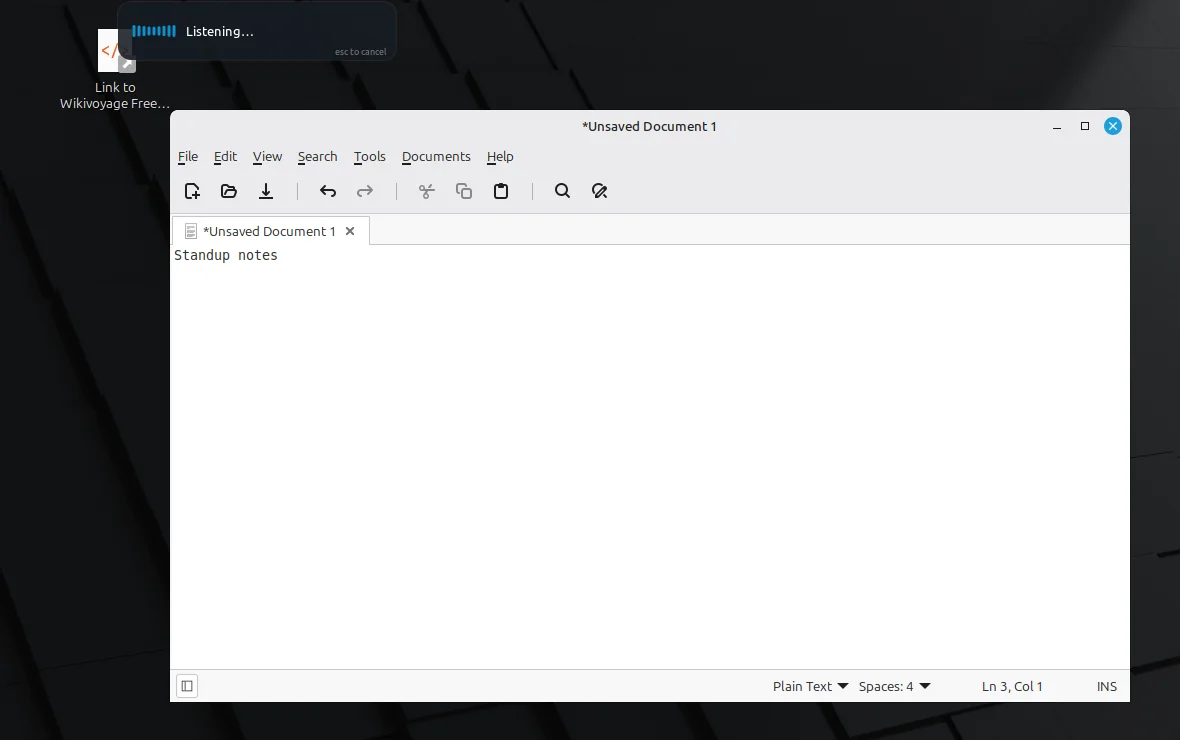
Right Alt held: the pill reads Listening…. SayCopyPaste 0.8.2 on Linux Mint 22.3 (Cinnamon, X11); the test sentence was played into a virtual microphone. Captured . Paste it
Press Ctrl+V to paste. In a terminal, press Ctrl+Shift+V. Nothing is typed or pasted for you, so you choose where the words go.
Press Esc while you're talking to cancel; nothing reaches the clipboard. The app in front sees that Esc too.
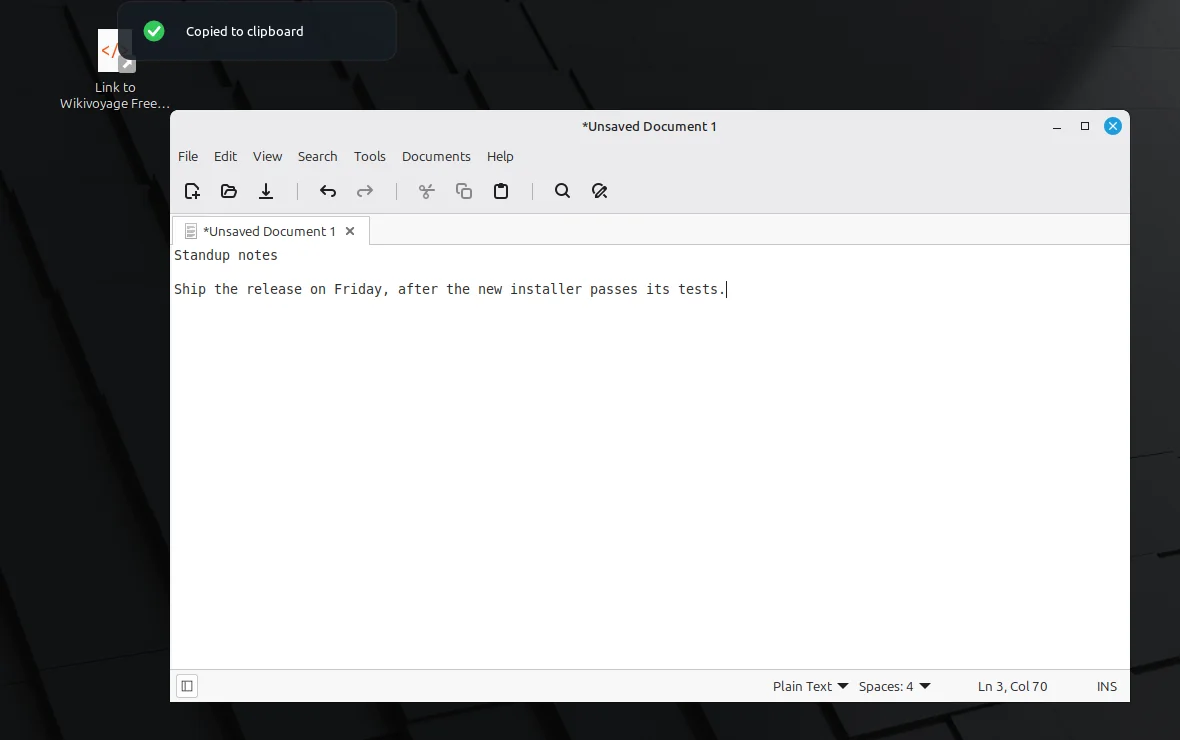
After letting go: Copied to clipboard, then Ctrl+V in the text editor. SayCopyPaste 0.8.2 on Linux Mint 22.3 (Cinnamon, X11). Captured . Add to what you just said
Hold Ctrl as you press Right Alt, and your next words join the last ones on the clipboard, so you can build a long passage in pieces.
A quick tap of Right Alt starts hands-free dictation; press it again to stop.
Pick your key, and keep it running
In Settings, choose Right Alt, Right Ctrl, Right Shift, Right Super, Pause/Break or Scroll Lock.
SayCopyPaste lives in the system tray. Turn on Launch SayCopyPaste when I sign in so your key works after a restart; it stays off until you turn it on.
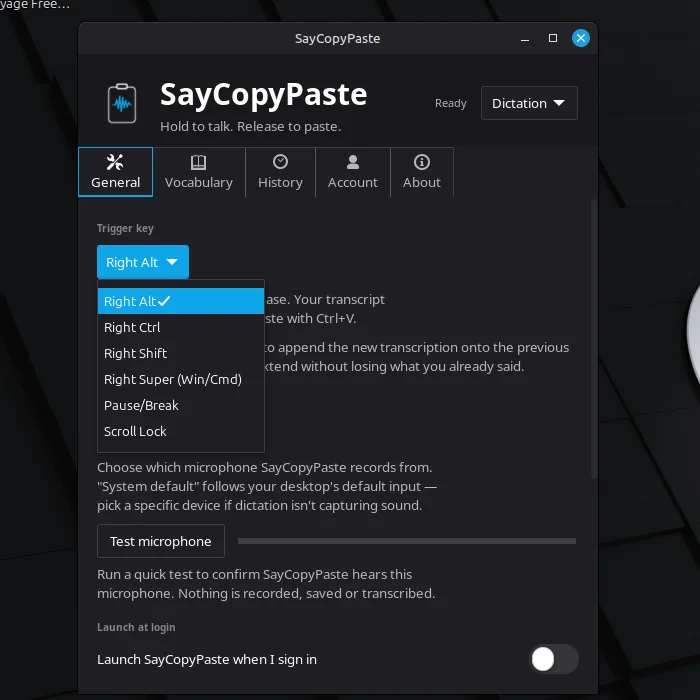
Settings, General: the six trigger keys, the microphone picker and Launch at login. SayCopyPaste 0.8.2 on Linux Mint 22.3. Captured .
X11, Wayland and Ubuntu
Linux desktops run on one of two display systems. To see which one yours uses, run echo $XDG_SESSION_TYPE in a terminal: it prints x11 or wayland.
SayCopyPaste's push-to-talk key uses X11, and we test it on Linux Mint 22.3's Cinnamon desktop, which runs on X11. We haven't tested it on Wayland.
Ubuntu 25.10 removed its Ubuntu on Xorg session, and Ubuntu 26.04 LTS runs its desktop only on Wayland. On those releases, a free app with Wayland support, such as Handy with its extra tools, is the safer choice for now.
When a free app is the better choice
Pick a free app if you want dictation that costs nothing, runs its speech model on your own computer and types the words in for you. Handy is the easiest place to start; nerd-dictation suits people who script; Speech Note suits people who want a notes app.
SayCopyPaste earns its price in a narrower case:
- nothing to download, build or wire up: no speech model, no Python, no shortcut plumbing;
- the clipboard works the same in every app, terminal and SSH session, and you decide where the words go;
- append as you go, cancel with Esc, a searchable history with favorites, and a vocabulary list for names and jargon;
- the same account and history on Mac, Windows, iPhone, iPad and Android, and on the web.
What SayCopyPaste doesn't do on Linux
- It needs an internet connection: your audio is sent for transcription and the text comes back. There's no on-device mode on computers.
- It doesn't type for you. It puts the words on the clipboard, and you paste them.
- The push-to-talk key and the pill staying on top are tested on X11 only. Wayland sessions are untested.
- It runs on 64-bit (x64) Linux only.
- One dictation can run up to about 13 minutes. On Linux, a longer one isn't transcribed when you let go, so stop and use Append for long passages.
- It doesn't transcribe audio files, take voice commands or translate.
- There's no free tier: after the 24-hour trial, it's $9.99/mo or the Bravely bundle.
FAQs
Does Linux have built-in speech to text?
Not in Linux Mint, and not in any Ubuntu release so far. Canonical announced Myna, a speech-to-text feature for Ubuntu 26.10, on 2026-06-17; it isn't out yet. Until then, add an app: a free one such as Handy or nerd-dictation, or SayCopyPaste.
Can I dictate on Linux without an internet connection?
Yes, with a free app that runs the speech model on your computer, such as Handy, nerd-dictation or Speech Note. SayCopyPaste can't: it needs a connection.
How do I use speech to text in a Linux terminal?
Dictate, then paste with the terminal's paste key: Ctrl+Shift+V in GNOME Terminal. With SayCopyPaste, hold Right Alt, talk, let go and press Ctrl+Shift+V. It's an ordinary paste, so it works in an SSH session too.
Does SayCopyPaste work on Wayland?
We haven't tested it there. Its push-to-talk key uses X11, and it's tested on Linux Mint's Cinnamon desktop, which runs on X11. If yours is a Wayland session, a free app with Wayland support is the safer choice for now.
Sources, with the date each was read
- Handy on GitHub (v0.9.7, 2026-09-18) (2026-09-27)
- nerd-dictation on GitHub (2026-09-27)
- Speech Note on GitHub (4.8.4) (2026-09-27)
- Ubuntu Discourse: Introducing Myna, speech to text for Ubuntu Desktop (2026-06-17) (2026-09-27)
- Ubuntu Discourse: Ubuntu 25.10 drops support for GNOME on Xorg (2025-06-10) (2026-09-27)
- Ubuntu 26.04 LTS release notes: summary for LTS users (2026-09-27)

SayCopyPaste
Voice to clipboard, one key
Free for 24 hours: every feature, no card.
Updated . Facts about other companies’ products were read on their own pages on the dates shown and can change.