Sticki.ly for iPhone Duo
The short answer
Yes. Sticki.ly 1.3.2 and later is optimized for iPhone Duo. Open the phone and Sticki.ly uses the full 7.6-inch inner display; fold it and it runs on the 5.4-inch outer display.
- Sticki.ly also runs on Mac, Windows, Linux, Android, iPad and the web, and your stickis are on every device you sign in on.
- Send any sticki as a link or a QR code, and it opens in a browser.
Try every feature free for 24 hours, no card needed.
- Updated
- Screens captured on Apple's iPhone Duo simulator
- All our apps for iPhone Duo
Open
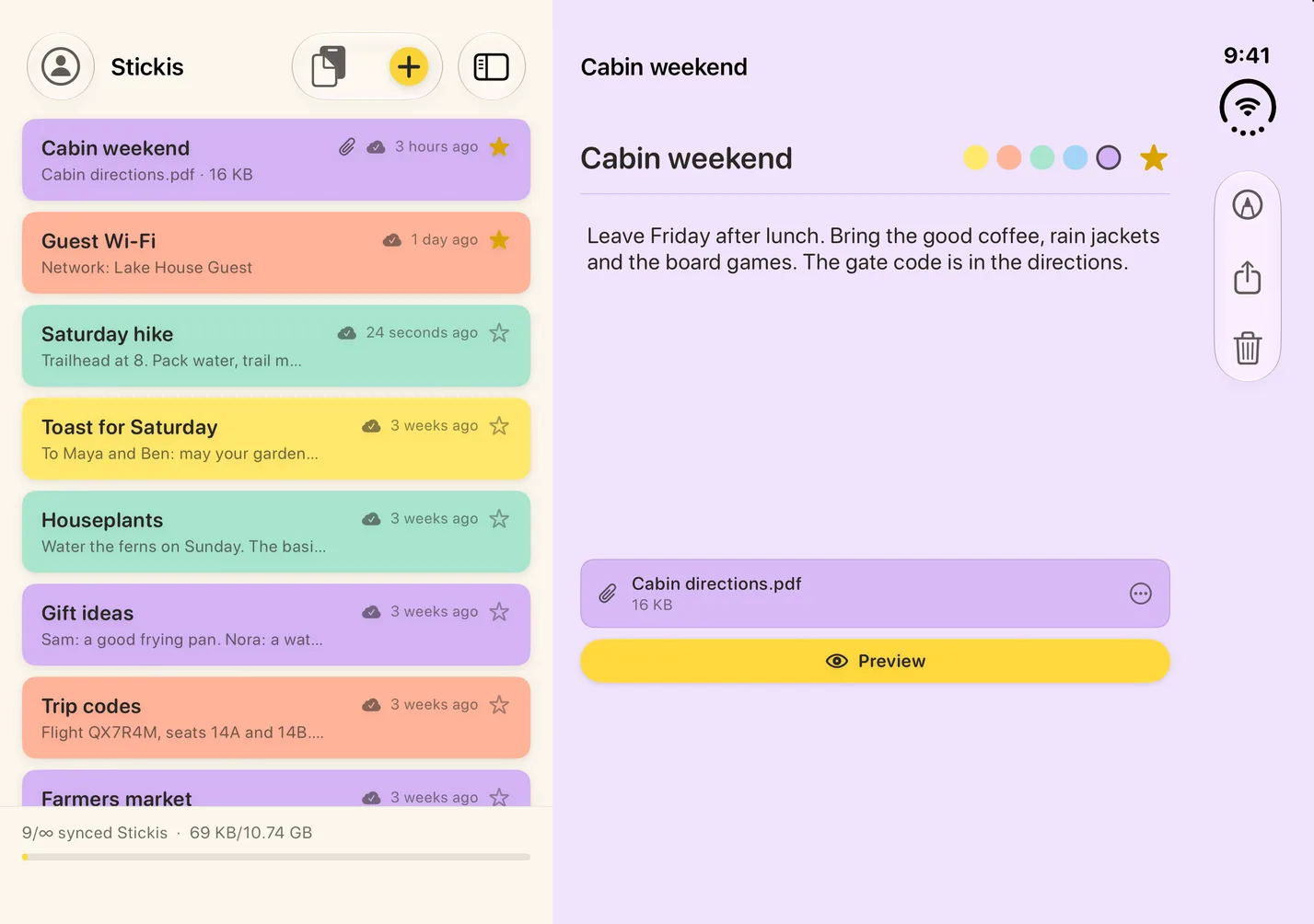
The 7.6-inch inner display
Sticki.ly sets your list of stickis beside the sticki you have open. Drag the edge of the list to widen it and see more of each title.
Closed
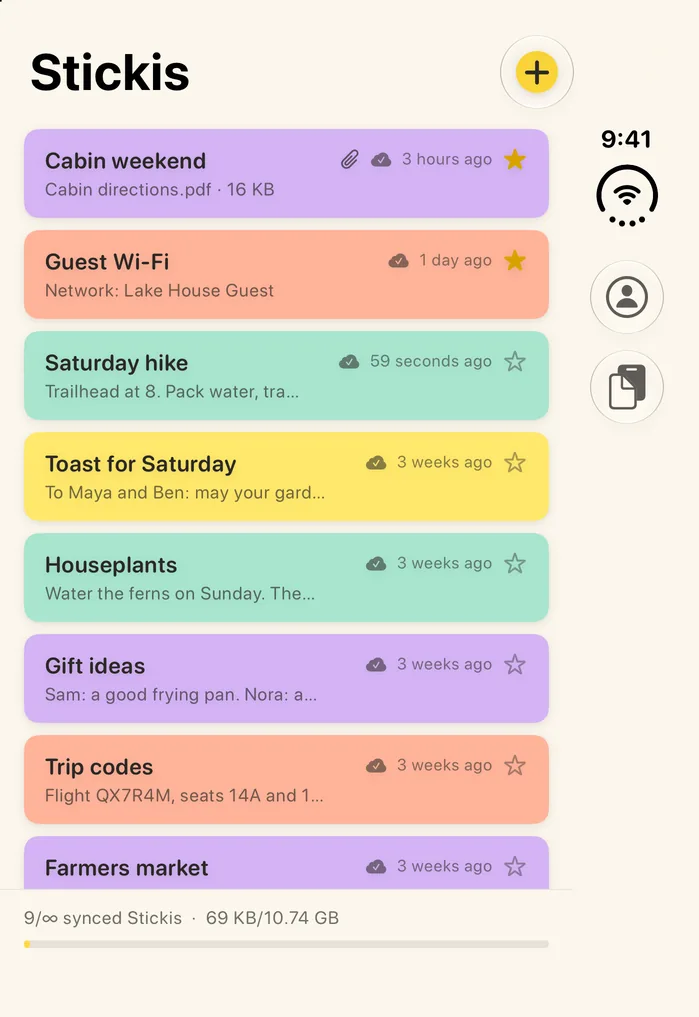
The 5.4-inch outer display
Closed, Sticki.ly shows your list of stickis, with + at the top and its other buttons down the right side. A sticki you open fills the display, with a back button to the list.
Fold it with a sticki open
Fold the phone with a sticki open and it stays open on the outer display. Open the phone again and it's still open, beside your list.
What Sticki.ly does on iPhone Duo
Sticki.ly is a sticky-notes app. Here's what it does:
- A title, a note and one file in every sticki. Attach a PDF, a photo or a document from your photo library or Files, up to 100 MB; a new file replaces the old one. Preview it, or save a copy to Files.
- Five paper colors and a star. Pick yellow, peach, mint, sky or lilac for each sticki, and star the ones you reach for most to keep them at the top of the list, on every device.
- Text or a link from another app becomes a new sticki when you share it to Sticki.ly, titled with its first line.
- Auto Sticki: tap Push clipboard to send what you've copied to your other devices, and tap any item in its list to copy it to this phone.
What Sticki.ly doesn't do on iPhone Duo
- There's no search, no tags, no folders, no reminders and no checklists.
- No widget can be set to show a sticki you choose.
- Sharing isn't co-editing: edits through a link are saved from a browser, not typed alongside you, and a shared sticki doesn't join the other person's list.
- On iPhone, Auto Sticki has no shortcut and never reads your clipboard on its own.
Questions about Sticki.ly on iPhone Duo
What makes Sticki.ly optimized for iPhone Duo?
It's built with Apple's iOS 27.1 SDK. Apple says apps built with that SDK or later are optimized for iPhone Duo: they extend to use the full display, with toolbars and tab bars appearing vertically below the status bar.
Can I send a sticki to someone who doesn't use Sticki.ly?
Yes. Use Share this Sticki from the sticki's toolbar, or press and hold it in the list. Whoever gets the link doesn't need an account to open it; it stays view-only unless you turn on Allow editing, and Stop Sharing turns the link off.
Do my sticky notes sync between iPhone Duo and my Mac or PC?
Yes. With both signed in to the same Bravely Account, a change you make on iPhone Duo shows up on your Mac or PC, usually within a minute. Sign in the same way on each device (Apple, Google or email): different sign-in methods can make two separate accounts. You can edit offline in the app too; changes sync when you're back online.
Is there a Sticki.ly widget for iPhone Duo?
Yes, four: Your Sticki shows your latest sticki on the Home Screen, small, medium or large; Sticki at a glance puts it on the Lock Screen; Your Stickis pages through the rest, with buttons to open one, copy its text or save its file; and New Sticki starts a new sticki in one tap. A New Sticki control also goes in Control Center or on the Lock Screen.
Do I need to buy Sticki.ly again for iPhone Duo?
No. iPhone Duo runs the same Sticki.ly app as iPhone and iPad, and a purchase on any platform, the App Store included, unlocks it when you sign in with the same Bravely Account.
What does Sticki.ly cost on iPhone Duo?
When the free 24 hours are up, you can add 24 more hours, once. After that, start a plan; the App Store shows its own prices, in your currency.
Sources, with the date each was read

Sticki.ly for iPhone Duo
Try every feature free for 24 hours, no card needed.
Updated . Facts about iPhone Duo were read on Apple’s own pages on the dates shown. Apple, iPhone, iPad and Mac are trademarks of Apple Inc., registered in the U.S. and other countries and regions. iPhone Duo is a trademark of Apple Inc. App Store is a service mark of Apple Inc., registered in the U.S. and other countries and regions. IOS is a trademark or registered trademark of Cisco in the U.S. and other countries and is used under license.