ASAPDF for iPhone Duo
The short answer
Yes. ASAPDF 0.15.8 and later is optimized for iPhone Duo. Open the phone and ASAPDF fills the 7.6-inch inner display; fold it and ASAPDF runs on the 5.4-inch outer display. It's the same ASAPDF as on iPhone and iPad.
Try every feature free for 24 hours, no card needed.
- Updated
- Screens captured on Apple's iPhone Duo simulator
- All our apps for iPhone Duo
Open
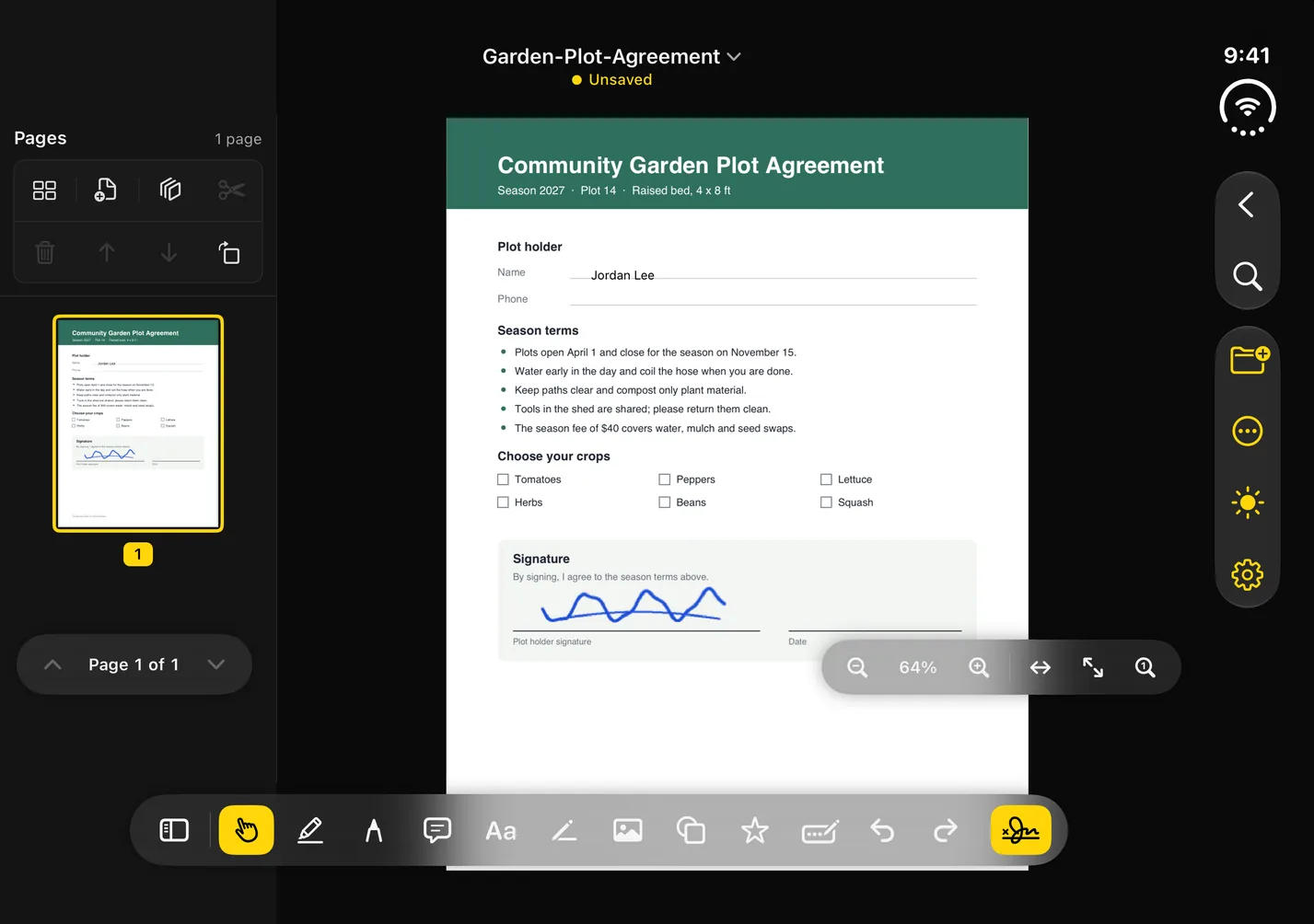
The 7.6-inch inner display
On the inner display, a whole page fits beside the pages sidebar, which holds the page thumbnails and the page tools.
Every editing tool has its own button in the toolbar along the bottom, and a rail down the right side holds find, the document menu, the appearance switch and settings.
Closed
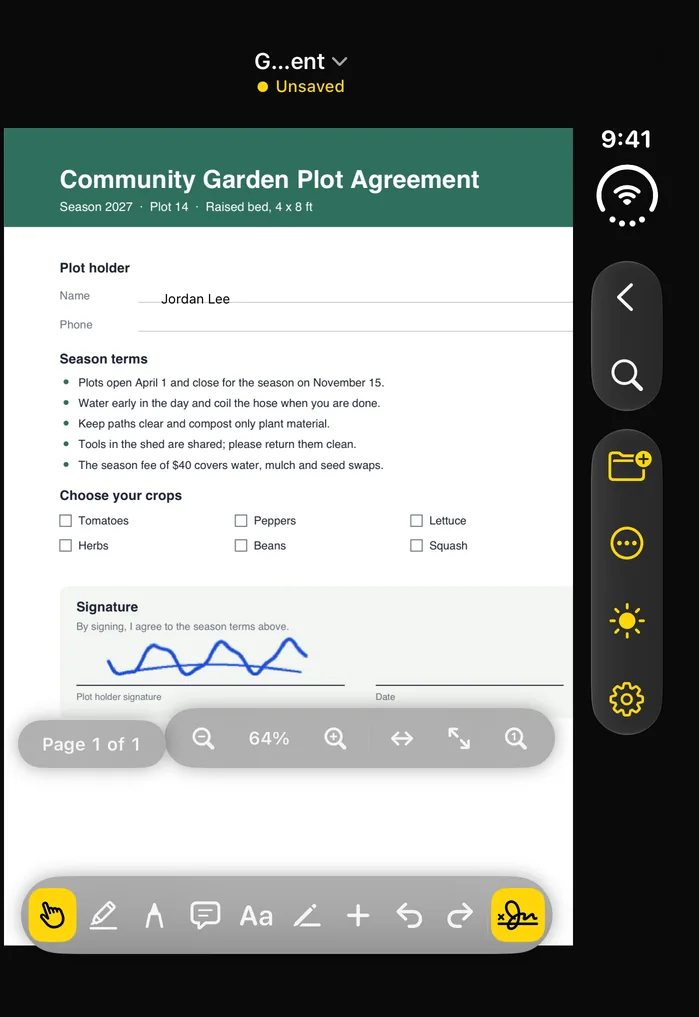
The 5.4-inch outer display
On the outer display, the page gets a shorter toolbar and the same rail down the right side, without the pages sidebar.
Fold it in the middle of an edit
Close the phone in the middle of an edit and ASAPDF keeps the document open on the outer display, with your unsaved changes (typed text, highlights and signatures) and your zoom level. Open the phone again and they're still there.
What ASAPDF does on iPhone Duo
Open a PDF from Files or another app, or start a new one:
- Edit text: tap a word to change or delete it; your new words come out in the original's font, size and color. Or add text anywhere, with a style bar for the font, size, color, alignment and a border.
- Fill forms: type in a PDF's own text fields and tap its check boxes, or let Detect Fields turn a form's blank lines into fields. Save text you type often, like your address, as a favorite, and ASAPDF offers it as you type.
- Mark up: highlight, draw and add notes in five colors, and add lines, arrows, rectangles, squares, circles, ovals and stars, outlined or filled.
- Pictures: place one from your photo library, the camera or Files, then move, resize or crop it, or give it a border.
- Organize pages: reorder, split and delete pages, insert a blank page, and merge other PDFs onto the end.
- Scan: point the camera at paper and ASAPDF captures each page, cropped to its edges when it finds them. Scanned pages come out searchable, so you can find, select and copy their text; for a scanned PDF from somewhere else, choose Make text searchable.
- Save, protect and share: save, save a copy or a flattened copy, lock a copy with a password and AES-256 encryption, print, or share. If ASAPDF closes before you save, it offers to recover your edits, and undo reaches back past a save, even after you close and reopen the document.
Send a PDF for signature from iPhone Duo
Choose Send for signature, place the boxes the other person fills in (signature, initials, date, text or a check box), then show the QR code, copy the link or email it.
The Sent for signature list shows each request and whether it's been opened or signed; from there, download the signed copy, send the email again or cancel the request.
ASAPDF on your other devices
ASAPDF runs on Mac, Windows, Linux, iPhone, iPad, Android and the web, and the signatures you save follow your Bravely Account to each of them.
What ASAPDF doesn't do on iPhone Duo
- No two-page view: on both displays, pages run one under another, and you scroll down through them.
- Each signature request goes to one person.
- Documents don't sync between your devices. A PDF you sign and save is copied to your cloud library, unless you turn that off in Settings.
- No redaction: deleting words with Edit text covers them with a white box, and the words underneath stay in the file.
Questions about ASAPDF on iPhone Duo
Is ASAPDF optimized for iPhone Duo?
Yes. Apple says apps built with the iOS 27.1 SDK or later are optimized for iPhone Duo and extend to use the full display, and ASAPDF is built with that SDK.
Can I sign a PDF on iPhone Duo?
Yes. Open it in ASAPDF and draw your signature with your finger, or upload or paste a screenshot of one you already have and ASAPDF turns it into clean ink. Then place it on the page and save.
Does the person I send it to need an app?
No. They scan the QR code with their phone's camera or open the link, and sign in the browser with no app and no account. The signed copy comes back to you with a Certificate of Completion.
Does ASAPDF add a watermark to my PDFs?
No. ASAPDF never adds a watermark or logo to your pages, during the trial or after.
Do I need to buy ASAPDF again for iPhone Duo?
No. A purchase on any platform, the App Store included, unlocks ASAPDF wherever you sign in with the same Bravely Account.
What happens when the 24-hour trial ends?
You can add 24 more hours, once. After that, start a plan; the App Store shows its own prices.
Sources, with the date each was read

ASAPDF for iPhone Duo
Try every feature free for 24 hours, no card needed.
Updated . Facts about iPhone Duo were read on Apple’s own pages on the dates shown. Apple, iPhone, iPad and Mac are trademarks of Apple Inc., registered in the U.S. and other countries and regions. iPhone Duo is a trademark of Apple Inc. App Store is a service mark of Apple Inc., registered in the U.S. and other countries and regions. IOS is a trademark or registered trademark of Cisco in the U.S. and other countries and is used under license.