Sign a PDF
- Open the PDF in ASAPDF.
- Choose the signature tool and draw your signature, or paste a screenshot of one.
- Place it on the page and save. Next time it is in your saved signatures.
 Download ASAPDF
Mac · ASAPDF.dmg · 19 MB · macOS 14 or later
Windows · ASAPDF-Setup.exe · 99 MB · Windows 10 (version 1809) or later
Linux · ASAPDF.deb · 91 MB · 64-bit Linux: .deb for Ubuntu, Mint and Debian, AppImage for the rest
iPhone & iPad · iOS 17 or later, on iPhone and iPad
Android · Android 8.0 or later
Thank you for downloading ASAPDF. Did your download not start? Click here to try again.
Prefer a portable build? Download the AppImage · 92 MB
On Ubuntu, Mint or Debian? Download for Linux (.deb) · 91 MB
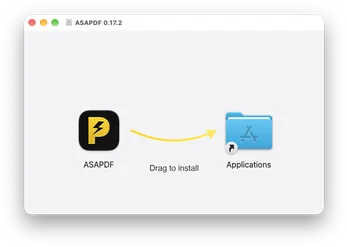
Open ASAPDF.dmg from your Downloads folder.
Drag ASAPDF into your Applications folder.
Open ASAPDF from Applications. macOS checks the signature once, then it opens.
Sign in with your Bravely Account: Apple, Google or email.
Open ASAPDF-Setup.exe from your Downloads folder.
If Windows shows a warning, choose More info, then Run anyway. The installer is signed by Bravely Studios LLC.
ASAPDF installs in a few seconds and opens on its own.
Sign in with your Bravely Account: Apple, Google or email.
Open ASAPDF.deb from your Downloads folder (Mint, Ubuntu and friends).
Your package installer takes it from there. Prefer a portable build? The AppImage is below.
Find ASAPDF in your app menu.
Sign in with your Bravely Account: Apple, Google or email.
Find ASAPDF.AppImage in your Downloads folder.
Right-click it, open Properties, and allow it to run as a program.
Double-click it. ASAPDF opens; there is nothing to install.
Sign in with your Bravely Account: Apple, Google or email.
Download ASAPDF.dmg again (19 MB).
Drag ASAPDF into your Applications folder. Open ASAPDF from Applications. macOS checks the signature once, then it opens.
Contact us and tell us what you see.
Download ASAPDF-Setup.exe again (99 MB).
If Windows shows a warning, choose More info, then Run anyway. The installer is signed by Bravely Studios LLC.
Contact us and tell us what you see.
Download ASAPDF.deb again (91 MB).
64-bit Linux: .deb for Ubuntu, Mint and Debian, AppImage for the rest. With the AppImage: right-click it, open Properties, and allow it to run as a program. Download the AppImage (92 MB).
Contact us and tell us what you see.
ASAPDF needs iOS 17 or later, on iPhone and iPad. It also runs in any current browser: Open ASAPDF on the web.
Contact us and tell us what you see.
ASAPDF needs Android 8.0 or later. It also runs in any current browser: Open ASAPDF on the web.
Contact us and tell us what you see.
Mac
macOS 14 or later
Windows
Windows 10 (version 1809) or later
Linux
64-bit Linux: .deb for Ubuntu, Mint and Debian, AppImage for the rest
iPhone & iPad
iOS 17 or later, on iPhone and iPad
Android
Android 8.0 or later
Web
Any current browser
Sign in with your Bravely Account, then choose how to start: try every feature free for 24 hours with no card, or pick a plan. The monthly and annual plans start with 7 days free.
Sign in with your Bravely Account, then choose how to start: try every feature free for 24 hours with no card, or pick a plan. The monthly and annual plans start with 7 days free.
Sign in with your Bravely Account, then choose how to start: try every feature free for 24 hours with no card, or pick a plan. The monthly and annual plans start with 7 days free.
Sign in with your Bravely Account, then choose how to start: try every feature free for 24 hours with no card, or pick a plan. The monthly and annual plans start with 7 days free.
Sign in with your Bravely Account, then choose how to start: try every feature free for 24 hours with no card, or pick a plan. The monthly and annual plans start with 7 days free.