Skip to content

Free tool · QR codes

Free QR Code Generator With No Expiration

A static QR code can't expire, whichever generator made it. This one makes only static codes, as a PNG or an SVG.

Get started How it works

Free with a Bravely account. No card.

  • No scan limit
  • No watermark
  • PNG and SVG

How it works

A code with no expiration in three steps

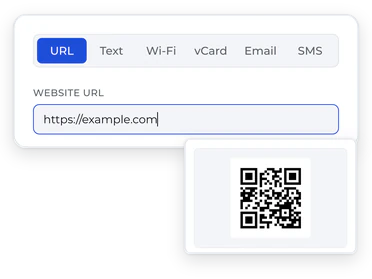
  1. The QR Code Generator's URL tab with https://example.com typed in, and its live preview of the code
    1

    Enter your link

    Sign in, claim it once, then type your link under Website URL.

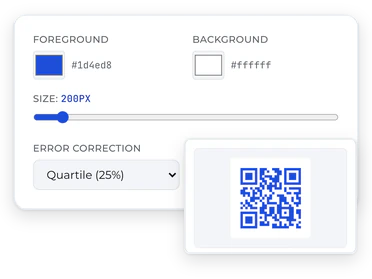
  2. The style controls set to a blue foreground, 200 px and Quartile error correction, with the code previewed in blue
    2

    Pick error correction

    Medium is the default. Quartile or High suit codes that get dirty.

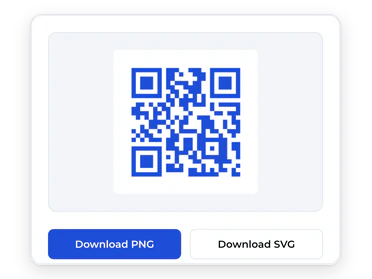
  3. The finished blue QR code above the Download PNG and Download SVG buttons
    3

    Download and print

    Download PNG or Download SVG. Nothing in the file can expire.

What you get

Everything included, free

Nothing to switch off

Your link is the code's own content, with no redirect through us.

No scan limit

Nothing of ours counts scans, so no number of scans can use a code up.

No watermark, no cap

The file carries no mark of ours, and nothing limits how many codes you make.

PNG and SVG

A PNG from 128 to 1024 pixels wide, or an SVG that scales to any print size.

Made in your browser

The link is turned into a code on the page and is never sent to our servers.

Error correction levels

Low, Medium, Quartile or High, so a printed code can be read with some of it dirty or damaged.

What people make with it

  • Product packaging
  • Restaurant menus
  • Signs and decals
  • Business cards
  • Printed manuals
  • Labels and plaques

Four generators, and which of their codes last

  • Built in

    Chrome's Create QR code

    Cost
    Free, part of Chrome
    Good for
    A quick code for a page you have open on a computer, from More, then "Cast, save, and share", then "Create QR code".
    Downside
    Google's help page doesn't say what the code holds or how long it lasts. Scan it and check that your phone shows your own address.

    Google Chrome Help: Share tabs in Chrome

  • Free

    Adobe Express

    Cost
    Free, as its page describes it
    Good for
    Static codes with your logo, a frame or a style. Its page says codes made there never expire.
    Downside
    PNG, JPEG or PDF, with no SVG on its page, and its static codes have a fixed destination too.

    Adobe Express: free QR code generator

  • Paid

    Scanova

    Cost
    Static codes are free; dynamic codes start at $5 a month, billed annually
    Good for
    Dynamic codes you can edit and track, for as long as you keep the subscription.
    Downside
    Its pricing page says a dynamic code made on the free trial stops working once the trial ends.

    Scanova: plans and pricing

  • Ours

    Bravely QR Code Generator

    Cost
    Free with a Bravely account and a one-time free claim
    Good for
    A code that has to outlast its print run: static only, so no code it makes depends on a plan.
    Downside
    Nothing opens until you have signed in with a free Bravely account and claimed it.

What it doesn’t do

  • It can't change where a code points. To send people somewhere else, you make and print a new code.
  • It can't keep your link alive. If the page the code points to moves or closes, the printed code leads nowhere.
  • It doesn't count scans, so it can't tell you whether a printed code is being used.
  • It doesn't put a logo or picture in the code, or change the shape of its dots and corner squares.
  • It doesn't check your two colors, the link you typed or its length. A link too long for a QR code leaves the preview blank, with no message.

Good to know

Why some free QR codes stop working

The printed code is fine. The redirect link inside it was switched off.

Read more

QR codes come in two kinds. A static code holds your link itself. A dynamic code holds a short link on the generator's own server, which forwards each scan to your real address. That forwarding is what lets a service count scans and let you edit the destination, and it is also what the service can stop.

The services say so themselves. Scanova's pricing page reads, "Your Dynamic QR Code will stop working once the free trial ends." The blog of Bitly's QR Code Generator, another vendor's tool, says codes made during a free trial "deactivate automatically when the trial period finishes", and that some free tools cap scans and then send people to a payment page or an error message. Both describe static codes as lasting: in the blog's words, "as long as the print lasts".

Static or dynamic?

Scan it and read the address before you open it.

Read more

Point a phone's camera at the code and read the address it shows before you tap. Your own address means the code is static. A short address on another company's domain means it is dynamic: Hovercode's pricing page says that, by default, people who scan its dynamic codes see Hovercode's own domains. A dynamic code lasts as long as its service keeps forwarding it.

Expiry aside, a static code fails for ordinary reasons, and they are yours to prevent. Point it at an address you control and mean to keep. Leave Quiet zone at 4, print dark on light, and scan a proof from where people will stand before you order a run.

Frequently asked questions

Do QR codes expire?

The pattern has no date in it: a QR code is your data drawn as squares. DENSO WAVE, the company that holds the QR Code trademark, says using one takes no fee and no license. What can stop is a redirect link that a generator put inside the code.

Why did my free QR code suddenly stop working?

Most likely it was a dynamic code made on a trial or a plan that has ended. The code holds the service's short link, and the service stopped forwarding it. The print can't be repaired: make a new code, and make it static if the destination won't change.

Is there a scan limit?

Not on a code this generator makes. A scan goes from the phone straight to your link, and nothing of ours is in between to count it or cap it.

Can I edit the code later?

No, and that is the trade. A code you can edit is a dynamic code, which depends on a service staying up and, at most providers, on an active plan. If the destination may change, pay for a dynamic code knowing that, or point a static code at an address on your own site and change what that address shows.

Do I need to sign up?

Yes. The generator opens after you select Get started, sign in with a free Bravely account and claim free lifetime access once. There is no paid plan behind it and no card to enter.

Is there a watermark or a logo on the code?

No. The file you download is the code and its margin, with nothing of ours added, at every size and in both formats.

Make a QR code that won't expire

Get started

Free with a Bravely account. No card.

From the same studio

Bravely Studios builds nine cross-platform desktop utilities: screenshots, PDF signing, remote desktop and more, with one plan that unlocks all of them. The same free Bravely account works everywhere.