Skip to content

Free tool · QR codes

Link to QR Code Generator

This generator turns a link into a QR code as a PNG or an SVG, with your own colors, a size you set and error correction.

Get started How it works

Free with a Bravely account. No card.

  • PNG and SVG
  • The link is in the code
  • No watermark

How it works

Turn a link into a QR code in three steps

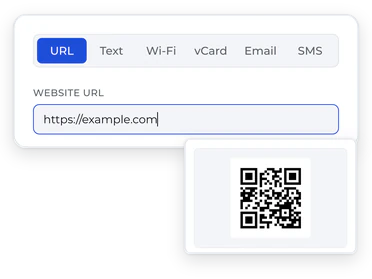
  1. The QR Code Generator's URL tab with https://example.com typed in, and its live preview of the code
    1

    Enter your link

    Sign in, claim it once, then type your link under Website URL.

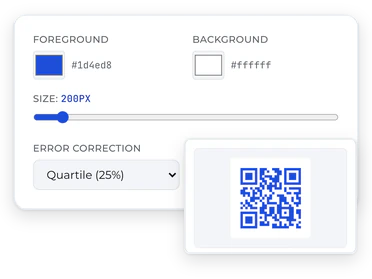
  2. The style controls set to a blue foreground, 200 px and Quartile error correction, with the code previewed in blue
    2

    Style it

    Set Foreground, Background, Size and Error correction. The preview updates.

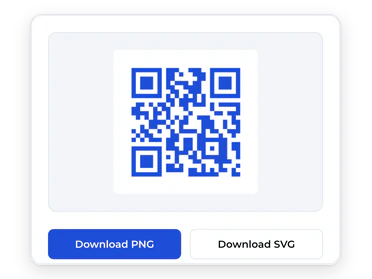
  3. The finished blue QR code above the Download PNG and Download SVG buttons
    3

    Download it

    Download PNG for screens or Download SVG for print.

What you get

Everything included, free

PNG and SVG

Download PNG saves a square image from 128 to 1024 pixels wide, and Download SVG saves a vector that scales to any print size.

Your two colors

Foreground and Background each take any color, starting from black on white.

Error correction levels

Low (7%), Medium (15%), Quartile (25%) or High (30%), with Medium as the default.

Quiet zone control

A slider sets the blank margin around the code from 0 to 10 modules, starting at 4.

Made in your browser

The link you type is turned into a code on the page and is never sent to our servers.

Five more code types

Beside URL, the same generator has tabs for Text, Wi-Fi, vCard, Email and SMS.

What people make with it

  • Flyers and posters
  • Business cards
  • Menus
  • Product packaging
  • Event signs
  • Slides

Four ways to turn a link into a QR code

  • Built in

    Chrome's Create QR code

    Cost
    Free, part of Chrome
    Good for
    A quick code for a page you have open on a computer: select More, then "Cast, save, and share", then "Create QR code", then Download.
    Downside
    Google's help page offers three things to do with the code (copy its link, download it, scan it) and names no choice of color, size, file type or error correction.

    Google Chrome Help: Share tabs in Chrome

  • Free

    Adobe Express

    Cost
    Free, as its page describes it
    Good for
    A static code with your logo in the middle, a frame or a style, downloaded as PNG, JPEG or PDF.
    Downside
    Its page lists no SVG download and doesn't say whether you need an account.

    Adobe Express: free QR code generator

  • Free

    Hovercode's free plan

    Cost
    Free for 3 dynamic codes; its Pro plan is $12 a month, billed monthly
    Good for
    A code whose destination you need to edit after printing, with scan counts and your logo on it.
    Downside
    A dynamic code holds a redirect link on the service's own domain, so every scan passes through the service. Codes past the first 3 expire if the subscription is canceled.

    Hovercode: pricing

  • Ours

    Bravely QR Code Generator

    Cost
    Free with a Bravely account and a one-time free claim
    Good for
    A code that is going to print, or one that has to carry your own colors.
    Downside
    Nothing opens until you have signed in with a free Bravely account and claimed it.

What it doesn’t do

  • It can't change where a code points. The link is the code, so a new link means making and printing a new code.
  • It doesn't count scans or show who scanned.
  • It doesn't test your two colors against each other. A pale code on a pale background downloads all the same.
  • It doesn't put a logo or picture in the code, or change the shape of its dots and corner squares.
  • It doesn't check the link or add the https at its start. What you type is what the code holds.
  • It doesn't warn you when a link is too long for a QR code. The preview goes blank and the download buttons do nothing.

Good to know

PNG or SVG, and how big

Set the PNG's width in the generator, and take the SVG for anything printed large.

Read more

Download PNG saves a square image at the width the Size slider shows. Set that width before you download instead of stretching the picture afterwards: DENSO WAVE, the company that holds the QR Code trademark, warns that when a code is enlarged or shrunk in an image tool every module becomes distorted, and the code can become hard or impossible to read.

Download SVG saves the same code as a vector, which a layout program or a print shop can scale to any size with its edges still sharp. Whichever file you take, leave Quiet zone at 4. The standard asks for a clear margin four modules wide on every side, and the slider goes below that.

Colors and error correction that scan

Dark on light is the safe pair, and Medium is the usual level.

Read more

DENSO WAVE's own advice is to print a code in black on a white background. It says a red code on white can't be read by scanners that use red light, and that other color pairs need testing before they are used. So scan your own pair with a phone, on the paper or screen it will live on, before you print a run.

Error correction is how much of a code can be dirty or damaged and still be read. DENSO WAVE says Medium is the level chosen most often, that Quartile or High suit places where a code gets dirty, and that raising the level makes the code bigger. A shorter link helps at any level, because more data needs more modules.

Frequently asked questions

How do I turn a link or a URL into a QR code?

There are two ways on this page. Chrome's Create QR code, in its More menu, makes one for the page you have open. For a code in your own colors and size, or an SVG, select Get started, sign in with a free Bravely account, claim free lifetime access once, and type the link under Website URL.

Can I make a QR code for a website for free?

Yes. Chrome's code costs nothing, and neither does this generator: it has no paid plan, puts no watermark on the file and doesn't limit how many codes you make.

Do I need an account to make a QR code here?

Yes. The generator runs on its own page behind the Get started button, and it opens only after you sign in with a free Bravely account and claim it. The picture at the top of this page is a drawing of the generator, not the generator. Google's steps for Chrome's Create QR code include no sign-in.

Can I change the link after I print the code?

No. A different link is a different code. If the destination has to change after printing, use a dynamic code, which holds a short redirect link that a service forwards and can point somewhere new, or print a code for an address on your own site and change what that address shows.

Will the code expire or stop after a number of scans?

No. Nothing of ours sits between the code and your link, so there is no clock and no counter to run out. The code stops working only if the page it points to goes away.

Turn a link into a QR code

Get started

Free with a Bravely account. No card.

From the same studio

Bravely Studios builds nine cross-platform desktop utilities: screenshots, PDF signing, remote desktop and more, with one plan that unlocks all of them. The same free Bravely account works everywhere.