Add your first task
- Type it in the quick-add box, like “Call the dentist tomorrow 4pm”.
- Press Return. The date and time are read out of the words.
- Find it in Today, or in Upcoming if it’s further out.
 Download Todoing.ly
Mac · Todoingly.dmg · 35 MB · macOS 14 or later
Windows · Todoingly-Setup.exe · 83 MB · Windows 10 or 11 (x64)
Linux · Todoingly.deb · 41 MB · 64-bit (x64) Linux with GTK 4 and FUSE 2
iPhone & iPad · iOS 17 or later, on iPhone and iPad
Android · Android 8.0 or later
Thank you for downloading Todoing.ly. Did your download not start? Click here to try again.
Can’t install the .deb? Download the AppImage · 41 MB
Or: Download for Linux (.deb) · 41 MB
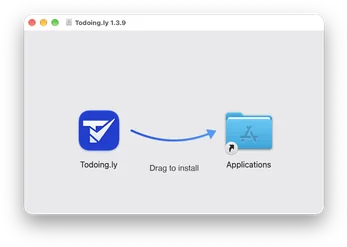
Open Todoingly.dmg from your Downloads folder.
Drag Todoing.ly into your Applications folder.
Open Todoing.ly from Applications. macOS checks the signature once, then it opens.
Sign in with your Bravely Account and add your first task.
Open Todoingly-Setup.exe from your Downloads folder.
If Windows shows a warning, choose More info, then Run anyway. The installer is signed by Bravely Studios LLC.
Todoing.ly installs for you, with no admin prompt, and opens on its own. Sign in with your Bravely Account.
Press Ctrl+Shift+Space anywhere to add a task.
Open Todoingly.deb from your Downloads folder and choose Install.
Todoing.ly shows up in your app menu and keeps itself up to date. Open it and sign in.
Add your first task.
Find Todoingly.AppImage in your Downloads folder.
Right-click it, open Properties, and allow it to run as a program.
Double-click it and sign in with your Bravely Account.
Download Todoingly.dmg again (35 MB).
Drag Todoing.ly into your Applications folder and open it from there. macOS checks the signature once, then it opens.
Allow notifications for Todoing.ly in System Settings, under Notifications.
Sign in with the same account, the same way (Apple, Google or email), on every device.
Connect to the internet. After more than 72 hours offline, Todoing.ly waits for a connection before it opens your tasks.
Contact us and tell us what you see.
Download Todoingly-Setup.exe again (83 MB).
Choose More info, then Run anyway. The installer is signed by Bravely Studios LLC.
Reminders arrive while Todoing.ly is running. Open it again; closing the window keeps it in the tray, and Quit stops it.
Sign in with the same account, the same way (Apple, Google or email), on every device.
Connect to the internet. After more than 72 hours offline, Todoing.ly waits for a connection before it opens your tasks.
Contact us and tell us what you see.
Download Todoingly.deb again (41 MB).
Use the AppImage instead, for other 64-bit (x64) Linux systems. It needs GTK 4 and FUSE 2. Download the AppImage (41 MB).
Some desktops have no tray. There, closing the window quits Todoing.ly, and reminders arrive only while it’s open.
Sign in with the same account, the same way (Apple, Google or email), on every device.
Connect to the internet. After more than 72 hours offline, Todoing.ly waits for a connection before it opens your tasks.
Contact us and tell us what you see.
Todoing.ly needs iOS 17 or later. You can also use it in a browser at todoingly.bravely.dev.
Sign in with the same account, the same way (Apple, Google or email), on every device.
Connect to the internet. After more than 72 hours offline, Todoing.ly waits for a connection before it opens your tasks.
Contact us and tell us what you see.
Todoing.ly needs Android 8.0 or later. You can also use it in a browser at todoingly.bravely.dev.
Sign in with the same account, the same way (Apple, Google or email), on every device.
Connect to the internet. After more than 72 hours offline, Todoing.ly waits for a connection before it opens your tasks.
Contact us and tell us what you see.
Sign in once and your tasks follow you everywhere you use Todoing.ly.
iPhone & iPad
iOS 17 or later, on iPhone and iPad
Android
Android 8.0 or later
Web
A current browser. Reminders on the web need notifications allowed.
Mac
macOS 14 or later
Windows
Windows 10 or 11 (x64)
Linux
64-bit (x64) Linux with GTK 4 and FUSE 2
Sign in with your Bravely Account and add your first task; the short tour after it is yours to skip. Then try everything free for 24 hours with no card, or start a plan with 7 days free. Allow notifications if you want reminders. Todoing.ly also sits in your menu bar, ready for a quick add.
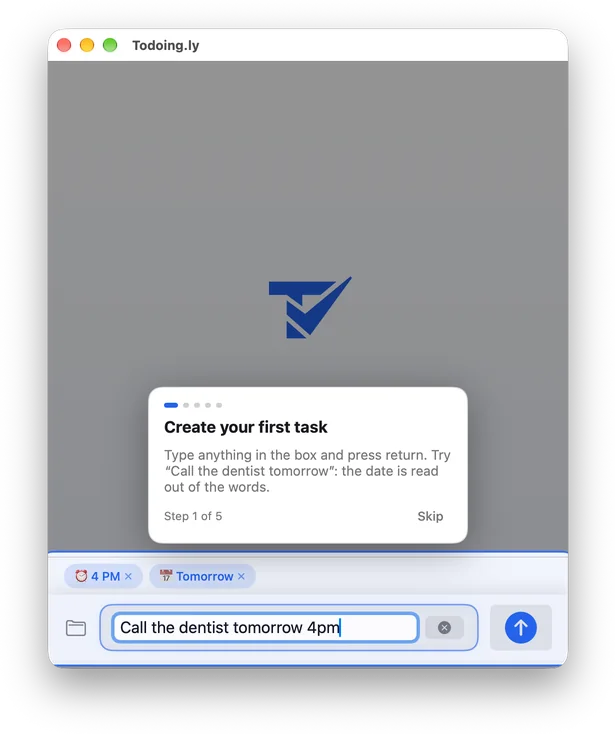
Sign in with your Bravely Account and add your first task; the short tour after it is yours to skip. Then try everything free for 24 hours with no card, or start a plan with 7 days free. Press Ctrl+Shift+Space anywhere to add a task. Closing the window keeps Todoing.ly in the tray, so your reminders still arrive.
Sign in with your Bravely Account and add your first task; the short tour after it is yours to skip. Then try everything free for 24 hours with no card, or start a plan with 7 days free. Reminders arrive while Todoing.ly is running; where your desktop has a tray, quick add lives there too.
Sign in with your Bravely Account and add your first task; the short tour after it is yours to skip. Then try everything free for 24 hours with no card, or start a plan. Already have a plan? Sign in with the same account and your tasks are there.
Sign in with your Bravely Account and add your first task; the short tour after it is yours to skip. Then try everything free for 24 hours with no card, or start a plan. Already have a plan? Sign in with the same account and your tasks are there.