Grab any of them right now — no account needed to install. Each app asks you to sign in when you open it, and unlocks the moment your bundle is on your account.
Calebar ·Calebar.dmg · 3.4 MB · macOS 14 Sonoma or later, on Apple silicon or Intel
Barmony ·Barmony.dmg · 4.0 MB · macOS 14 Sonoma or later, on Apple silicon or Intel
Sleepover ·Sleepover.dmg · 3.6 MB · macOS 14 Sonoma or later, on Apple silicon or Intel
Graf ·Graf.dmg · 3.7 MB · macOS 14 Sonoma or later, on Apple silicon or Intel
MonitorMonitor ·MonitorMonitor.dmg · 9.3 MB · macOS 14 Sonoma or later, on Apple silicon or Intel
Not on a Mac? The Mac Utility Bundle runs on macOS 14 or later. Open this page on your Mac to download the apps.
Thank you for downloading Mac Utility Bundle. Did your download not start? Click here to try again.
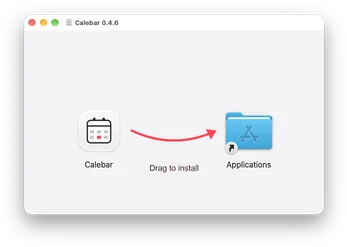
Drag it into your Applications folder and open it from there. macOS checks the signature once, then it opens.
I can’t find the app after opening it
Each app lives in your menu bar, at the top right of your screen, not in the Dock.
Barmony does not tuck anything away on macOS 27
Open System Settings, then Privacy & Security, then Accessibility, and turn Barmony on. Then click the chevron again.
Calebar shows no events
Click Show my events and allow calendar access. Google and other accounts show up once they’re added in System Settings, under Internet Accounts.
MonitorMonitor only dims a display
Some monitors, ports and docks don’t let a Mac change hardware brightness. MonitorMonitor dims those displays instead and says so on their card in its menu bar panel.
MonitorMonitor does not move windows
Open System Settings, then Privacy & Security, then Accessibility, and turn MonitorMonitor on. Then pick the spot again.
An app still asks me to buy
Sign in with the account that bought the bundle. It lives on your Bravely account, so every app unlocks on every Mac you sign in to.
Drag it into your Applications folder and open it from there. macOS checks the signature once, then it opens.
I can’t find the app after opening it
Each app lives in your menu bar, at the top right of your screen, not in the Dock.
MonitorMonitor only dims a display
Some monitors, ports and docks don’t let a Mac change hardware brightness. MonitorMonitor dims those displays instead and says so on their card in its menu bar panel.
MonitorMonitor does not move windows
Open System Settings, then Privacy & Security, then Accessibility, and turn MonitorMonitor on. Then pick the spot again.
An app still asks me to buy
Sign in with the account that bought the bundle. It lives on your Bravely account, so every app unlocks on every Mac you sign in to.
Hold ⌘ and drag the icons you don’t need to the left of Barmony’s dot.
Click the chevron and they’re tucked away. On macOS 27, allow Barmony under Accessibility the first time.
Click the chevron again whenever you want them back.
Jump to a date with Calebar
Click Calebar in the menu bar.
Type a date in the Jump to date box: Dec 25, next fri or tomorrow.
Press Return and the calendar jumps there. Click a day to see what’s on it.
Keep your Mac awake with Sleepover
Click the owl in your menu bar. Its eyes light up while your Mac stays awake.
Right-click the owl for 15 or 30 minutes, 1, 2 or 4 hours; the menu counts down.
Click the owl again, or choose Let It Sleep, and your Mac sleeps normally.
What happens next
Open it from Applications and sign in with your Bravely Account. If the bundle is on your account, it unlocks right away; if not, you’ll see the bundle offer. Look for its icon in your menu bar, not the Dock. Sign in the same way in each app, with the account that bought the bundle.
The Mac Utility Bundle runs on macOS 14 or later. Open this page on your Mac to download the apps.
The Mac Utility Bundle runs on macOS 14 or later. Open this page on your Mac to download the apps.
The Mac Utility Bundle runs on macOS 14 or later. Open this page on your Mac to download the apps.
The Mac Utility Bundle runs on macOS 14 or later. Open this page on your Mac to download the apps.