How to remote into a Mac from Windows
The short answer
Windows can’t do it by itself: Microsoft’s Remote Desktop connects to Windows PCs, not to a Mac. So the Mac needs something that lets it be reached. On the same home or office network, the Mac’s built-in Screen Sharing works with a free VNC viewer on the PC. From anywhere, use an app that runs on both computers, such as Chrome Remote Desktop or Scry.
- Scry runs on the Mac and on Windows: sign in to the same account on both, then pick the Mac from your list.
- No router setup: Scry connects directly when the network allows, and through an encrypted relay otherwise.
- Try every Scry feature free for 24 hours, with no card.
Setup is free, and you’ll see Scry connect before it asks you to pick a plan. Then try every feature for 24 hours with no card.
- Updated
- Outside facts dated and linked at the bottom
Your options
The built-in and free ways first. Each one has a real catch, listed with it.
Step by step with Scry
Scry goes on both ends: the Mac you want to reach, and the PC you connect from.
On the Mac: install Scry and allow two permissions
Download Scry for Mac, open Scry.dmg and drag Scry into your Applications folder. Open it and sign in with your Bravely Account: Apple, Google or email.
Then allow Screen Recording and Accessibility for Scry in System Settings, under Privacy & Security. Until both are on, the Mac can’t be reached.
Turn on Launch Scry at login in Scry’s Settings, so Scry starts whenever someone signs in to the Mac.
On the Windows PC: install Scry, or use Chrome
Download Scry for Windows and run Scry-Setup.exe; the installer is signed by Bravely Studios LLC. Sign in the same way you did on the Mac, so both computers are on one account.
If Windows asks to let Scry make changes, choose Yes. That installs the background service that lets you reach this PC too.
No Scry on the PC you’re using? Sign in at scry.bravely.dev in Chrome and connect from there.
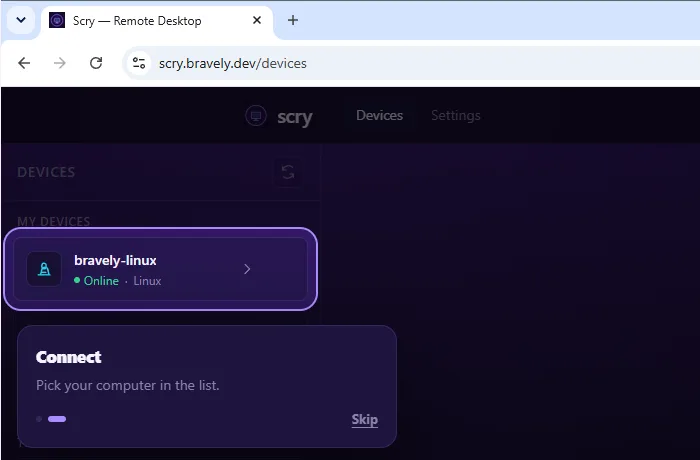
Scry’s browser client in Chrome on a Windows 11 PC, signed in to a test account with its Linux computer online. A Mac you set up appears in the same list. Captured . Pick the Mac and connect
Every computer you’ve set up shows up in one list, with a dot that shows whether it’s online. Click the Mac to connect.
You see the Mac’s screen and drive it with your own mouse and keyboard. If the Mac is locked, type its password at its lock screen.
While you’re connected
Copy text on one computer and paste it on the other, in either direction.
Drop a file into Scry to send it to the Mac. Someone clicks Save on the Mac, and you can click it yourself in the session.
If the Mac has more than one display, Scry shows one at a time and lets you switch between them.
Why Microsoft’s Remote Desktop can’t reach a Mac
Remote Desktop, whose apps are now called Windows App, connects to Windows. Microsoft lists what can act as its host: PCs running Windows Pro, Enterprise or Education, and Windows Server. Windows App also reaches Microsoft’s own cloud PCs. A Mac isn’t on that list.
Apple’s own sharing uses a different standard: Apple says Screen Sharing is compatible with VNC. That’s why a VNC viewer on the PC works on your home network, and why reaching a Mac from anywhere takes an app installed on both computers.
The free way on your home network
On the Mac, open System Settings, click General, then Sharing. Click the info button next to Screen Sharing, turn Screen Sharing on, and turn on VNC viewers may control screen with password. Choose a new password for it: Apple advises against the password of any user account on the Mac.
On the PC, open a VNC viewer, connect to the Mac’s address on your network, and enter that password. Both computers need to be on the same network, and the Mac has to be awake.
What Scry doesn’t do here
- It can’t wake a sleeping Mac, and a Mac that has restarted can be reached again only once someone signs in to it. A locked Mac is fine.
- It shows one display at a time. You switch between displays rather than seeing them side by side.
- Files go one way: from the computer you’re on to the Mac you’re controlling.
- It isn’t free: after the trial, it’s a paid plan.
FAQs
Can I remote into a Mac from Windows for free?
Yes, two ways. On the same network, turn on Screen Sharing on the Mac and connect with a free VNC viewer on the PC. Over the internet, Chrome Remote Desktop is free with a Google account. Scry is paid after its trial: 24 hours free with no card, or 7 days free when you start a monthly or annual plan.
Can Microsoft Remote Desktop connect to a Mac?
No. Microsoft lists Windows PCs running Pro, Enterprise or Education, and Windows Server, as the computers Remote Desktop connects to, and Windows App adds Microsoft’s cloud PCs. To reach a Mac, the Mac needs its own sharing turned on, or an app such as Chrome Remote Desktop or Scry.
Does the Mac have to be on the same network as the PC?
For the Mac’s built-in Screen Sharing, yes: Apple documents it for computers on your network. Chrome Remote Desktop and Scry work over the internet. Scry needs no router setup: it connects directly when the network allows, and through an encrypted relay otherwise.
Can I control my Windows PC from the Mac too?
Yes. Scry on the Mac connects to the Windows PCs and Linux computers on your account the same way, once Scry is set up on them.
Is remote access to my Mac secure with Scry?
Every session is end-to-end encrypted between your two devices, and our servers never see your screen. When a network blocks a direct path, the session goes through a relay and stays encrypted the whole way.
Do I have to install Scry on the Windows PC?
No. You can sign in at scry.bravely.dev in Chrome and connect from there. The Mac always needs Scry installed, since that’s what lets it be reached.
Sources, with the date each was read
- Apple: Turn Mac screen sharing on or off (2026-09-27)
- Apple Remote Desktop guide: VNC access and control (2026-09-27)
- Apple: If you can’t share Mac screens (2026-09-27)
- Microsoft Learn: Enable Remote Desktop on your PC (2026-09-27)
- Microsoft Learn: What is Windows App? (2026-09-27)
- Google: Access another computer with Chrome Remote Desktop (2026-09-27)
Scry
Remote desktop, anywhere
Free for 24 hours: every feature, no card.
Updated . Facts about other companies’ products were read on their own pages on the dates shown and can change.